Water Tool Properties
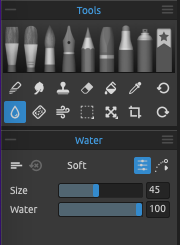 Add water strokes to the current layer.
Activate the Water tool by clicking the button in the Tools panel or by tapping the W shortcut.
Size - Select the size of the "Water" tool (1-100).
Water - Select the amount of water (1-100).
Rotation - Determines the angle of the rotation of the brush (0° to 359°).
Note
The Rotation slider is hidden by default. You can view it anytime in the Properties panel menu > Show Sliders.
The more water is selected, the wetter the canvas gets.