


In the last days, we have written about the new design, brushes, painting modes and gradients. This blog is about the layers and all the new possibilities with them.
Flame Painter 2.0 is coming in two versions: Personal and Professional.
In Personal you are able to add three separate layers. You can manipulate them in many ways; they can be rearranged, you can duplicate them, or if you need some space, you can collapse more layers into one. You can import pictures or photos, paint over it and remove any layers that you don’t need.
In the Professional version, you can additionally make an unlimited number of layers and you can also add editable Vector Layers. But.. what are the Vector Layers?
Vector Layers
I think that Vector Layers are huge. You can paint a flame stroke on a layer and after that - you can modify its color, gradient or opacity, but most importantly edit all brush parameters, change its detail and easily modify the stroke to the desired one. You can change its shape, rescale it, rotate it, or even pick a brush preset and completely modify the stroke, so you do not need to paint it all from the beginning every time. The best part is that you see the changes as you move the sliders, everything is changed immediately, and you just have to wait for a second to re-render a layer. For me, this feature is the best one. Seriously. No, not seriously - it’s really great fun.:)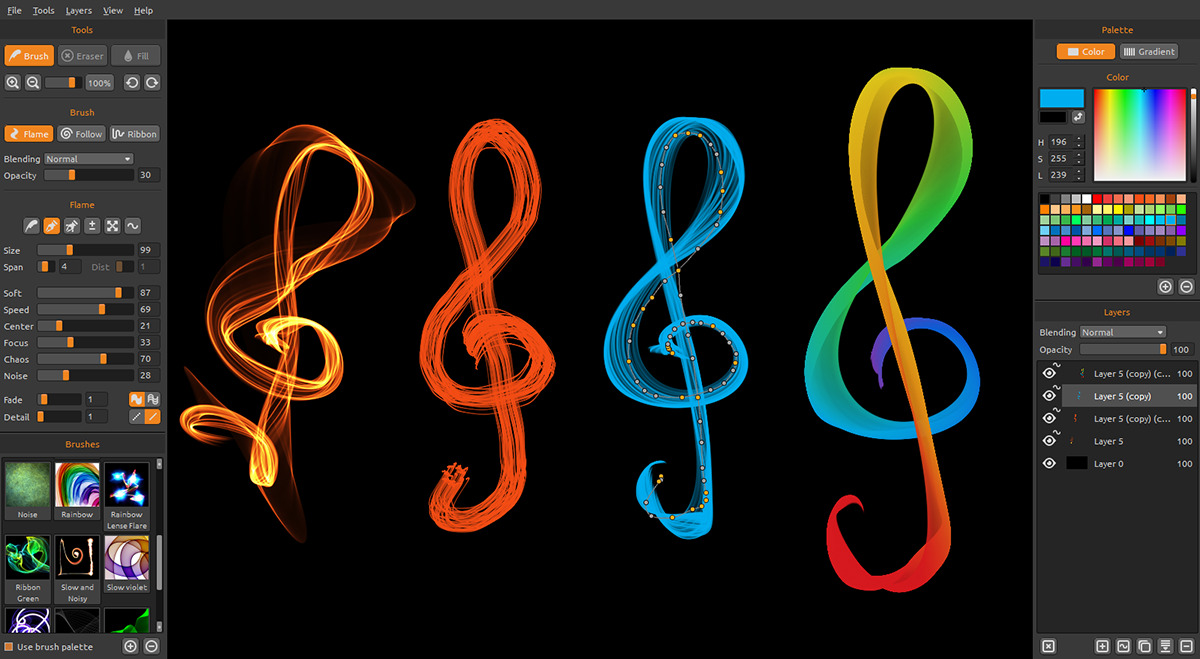
Editable Vector Layer - you can change all parameters after painting (Flame Painter 2 Pro)
Bounding Box Wheel
One thing I miss, in every vector or bitmap or 3D editor, is an advanced bounding box. One would say, what can be advanced on a bounding box? It can be rescaled or rotated and that’s it. You can resize it in X or Y axes in global or local coordinates and that is all that you can do. What I have always missed is that many times I need to rescale the object in another angle than in local or global coordinates. So I’ve invented the wheel. :) A bounding box wheel. (The regular wheel was invented a few years before the bounding box wheel). With this little wheel, you can rotate a bounding box in a direction you need and then rescale a curve or shape not only in local or global coordinates but in any coordinate on this planet!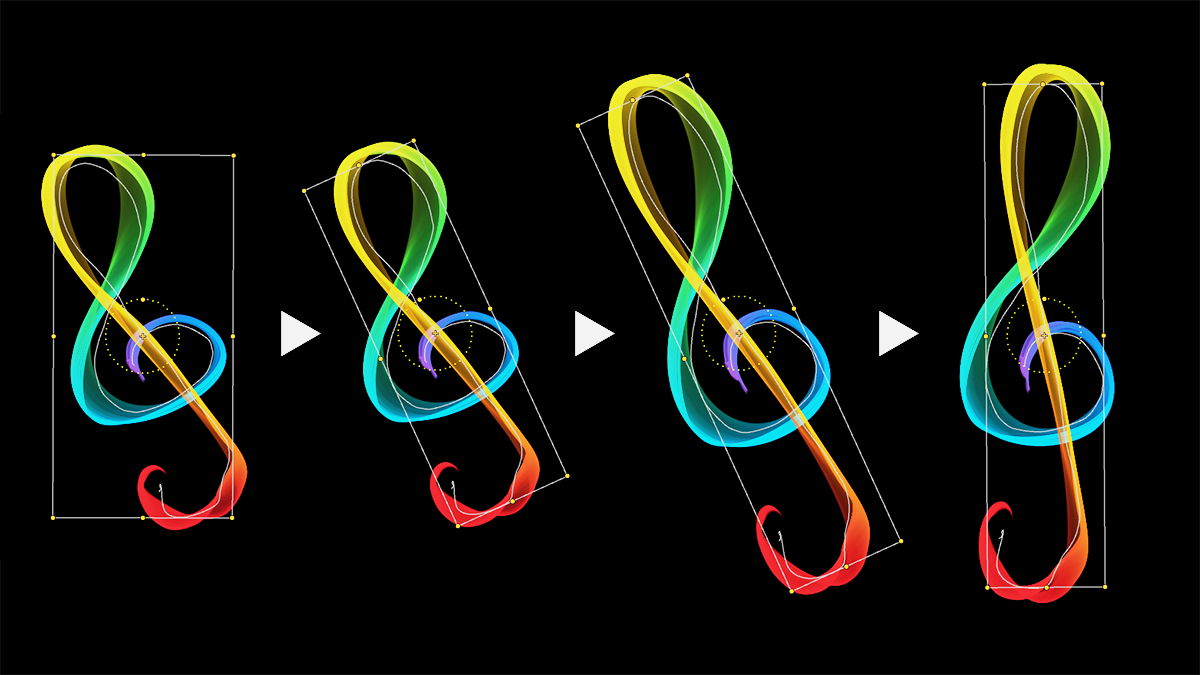
Advanced Bounding Box with the Bounding Box Wheel
The Flame Painter 2.0 has been made from the ground with a focus on intuitive use and features that help artists to enjoy creativity as much as possible. We hope you will like it.
All this will be available from 21st May, so do not forget to update and be among the first ones who can try this magic.
Thank you for your support and your feedback. It is really the fuel for our work.
Peter and The Flame Painter Team

What do you think?
0 Responses
0
Upvote
0
Funny
0
Love
0
Surprised
0
Angry
0
Sad
Sign in to comment!
Just purchased this gem today. Fantastic but still I would like the ability to merge vector layers. Very much like this new feature for when I create my glass sculptures using Broadsweep brush. Anyway, kudos to the developers and look forward to the many new features that I know will be added (including border wrap for seamless textures). :)
You can merge them, just after that they are not vector layers anymore.. :] Border wrap will come soon again (like in 1.7), just have to implement it back to render engine.
Yeah; but I would like to keep it vectored. An example is a the layer vector of the word Gimp. G on one layer, imp on another layer and the dot for the i on a third layer then merge the 3 vector layers before stroking. Maybe I just have to not be so lazy and stroke all three layers separately. lol
Again, thanks for the reply Peter. Thanks for the discount too since $29 is very reasonable for this gem with the vectored layer ability. Added more comments on the main release thread too (would be cool to be able to import an SVG layer for instance) but I might be asking for too much. lol
:)
I have problems to run the version 1.7 in windows 8 on a Surface Pro tablet...I wonder if version 2.0 will work. By the way, work perfectly in windows 7.
We haven't tried 1.7 on Surface Tablet, but it works with Intuos for sure. You can try version 2.0 if you like today.. :)