


Dear artists and all great fans! We are very excited to announce that after a year of preparation and development, we are launching the brand new Flame Painter version 2.0 for Windows and Mac OS on May 21st! We are so happy about it, that we could not wait any longer to unveil its new fantastic features. We hope you will enjoy it, as much as we do.
One of the things we love about creating Flame Painter is that all, artists and enthusiasts, give us such positive feedback. This continuously motivates us, to strive forward and give the best we can for our users. We have listened to and implemented as many of your suggestions as possible in order to make Flame Painter the best tool for your art and your creativity.
Until the release date, we would like to introduce you to Flame Painter 2.0 in five blogs covering new key features. The first thing each of you will notice is:
The New User Interface
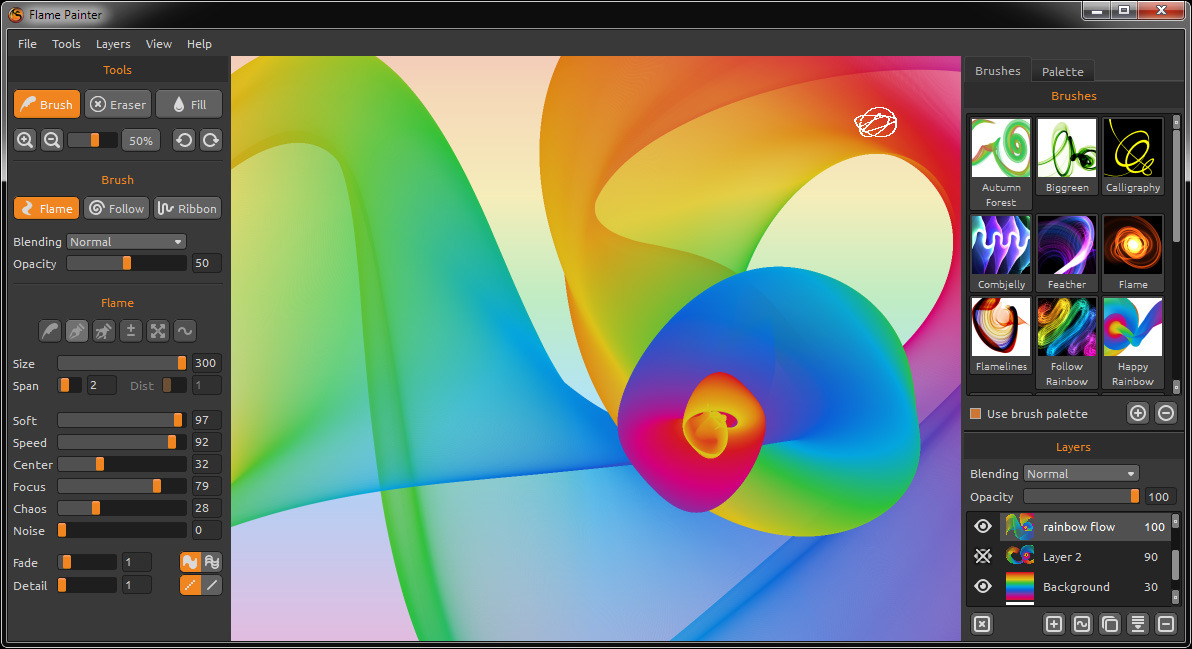
As an artist myself, I know when I want to focus on art and don’t want to be distracted with different stuff around it. Sometimes I need all windows in one screen, but other times I prefer to use all the space for painting and leaving the toolboxes out of my view. So I have decided to completely redesign the interface and throw away the old one. We redesigned it many times, and finally created; a new compact but very flexible interface, using a new backbone system with widgets.
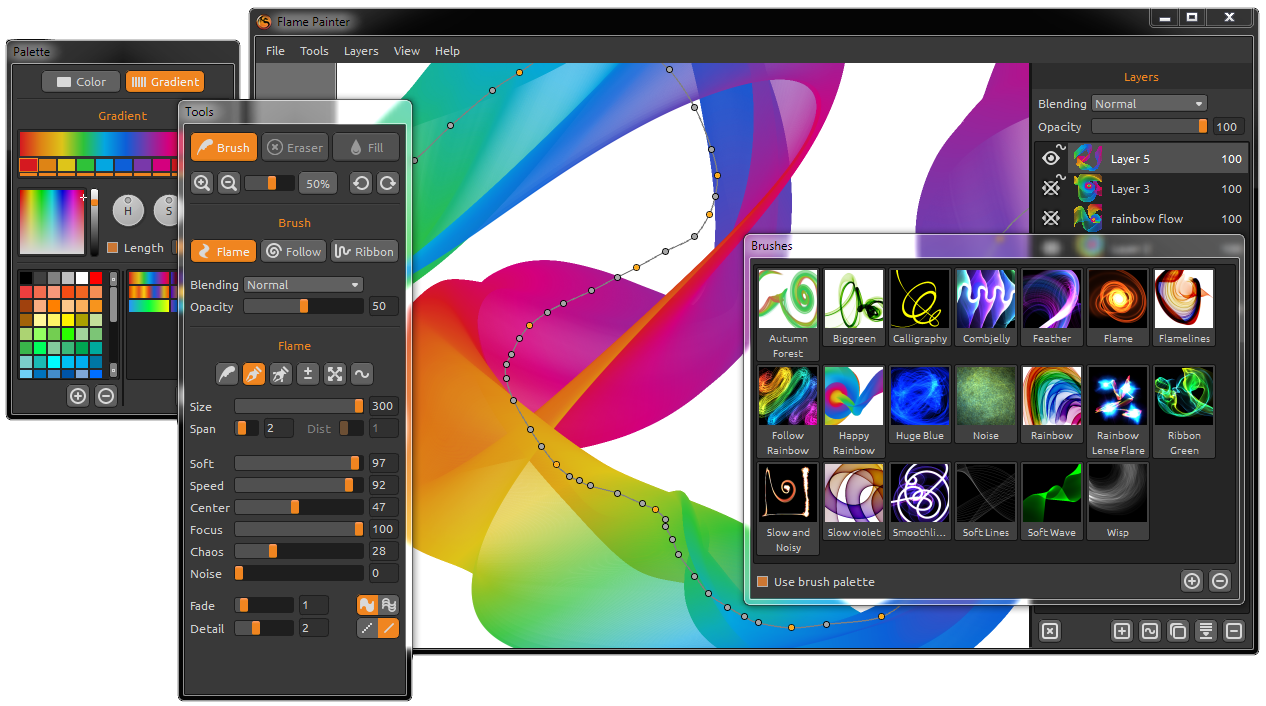
The interface is now more intuitive, and customizable and allows more focus on the creative process. The design compared to the first version is very different. The interface is created from toolboxes, which you can snap to the main canvas screen, or undock and move to a second monitor so your primary screen will be free for painting. We really love this and hope you will enjoy it as well!
That’s all for today, but it is just a start and in two days we will take a closer look at brushes and their new features. Stay tuned and mark the 21st of May on your calendar. :)
Peter & The Flame Painter Team

What do you think?
0 Responses
0
Upvote
0
Funny
0
Love
0
Surprised
0
Angry
0
Sad
Sign in to comment!
Duck and cover, boys! This has just officially blown the doors off of all my technical constraints!!
Is that point path what I think it is?! Can we adjust gradients along a path after drawing? If so, my world has just been significantly rocked.
Yes Gregorii, we created new Vector Layer, after painting a stroke you can edit every parameter - gradient, color, blending mode.. all flame parameters and modify curve as you wish. We will write about it more in Thursday. :)
Please add "Internet Connection (required for activation)" to the System Requirements list.
Thank you for suggestion, I added the note to the website.
Роскошный подарок!
Сгораю от нетерпения!
спасибо Iulia! :)
Wow guys this looks awesome, can't wait to play with this!
i just bought the older version last night...can i get a refund and wait for the newer version since you state that i am going to have to pay for the new one?
Hello Tom, We believe that all our users which bought a 1.x version will get a fair treatment and we plan to give everyone who purchased it a special offer. Please keep track of our FB page as well as our newsletter and blog to not miss it. Of course if for any reason you are not satisfied with Flame Painter you can still obtain a full refund.
thank you for your reply...i have enjoyed your product immensely so far and look forward to the new version....keep up the good work!!!!
Great Job! I'm eager to get it!
Thanks a lot Elio!
Sounds great, can't wait to see it.
Question: did you come up with a way to allow us to save different size canvases to open? For example, 640 x 1136 for iPhone 5, 1680 x 1050 for MacBook Pro, etc. I'd love to have a drop down list or a menu that would let me choose a canvas of a specific size without having to type something into a dialog box.
Yes, it is on our feature list. It will be probably not in the first 2.0 version, but for sure in on of the 2.x version soon.
Awesome! For those that have purchased already, is there an upgrade fee, or does it have a cost?
Upgrade to 2.0 is not free, but users which bought the first version will have a discount from the full price.
I just purchased two weeks ago :( is there a certain time period from which a user purchases that the upgrade could be at no cost?
Jon, all our users will get a fair treatment and we plan to give everyone who purchased the first version a special offer. Please keep track of our facebook page as well as our newsletter and blog to not miss it.
Peter, thanks for all the constant updates! The reality of the situation is this...I paid $20 for the software, and I will more than likely purchase the professional version for $30...So, for $50, I really can't complain. I know with my designs for my clients I will make that money back. Huge fan of the software! Thanks for all the updates.
Amazing =)