


Hello, our dear friends and fans!
Today we’ll continue in our blog series in which we’d like to present you the next key features of the upcoming Flame Painter 3. We started with last week’s blog post, where we talked about Photoshop Plug-in, PSD, and SVG file formats along with new blending modes. However, we don’t stop here. As always, we crossed the borders, added more features which are not usual in other applications and connected Flame Painter not only with third party software but also with other advantageous hardware.
High-Resolution Renderer
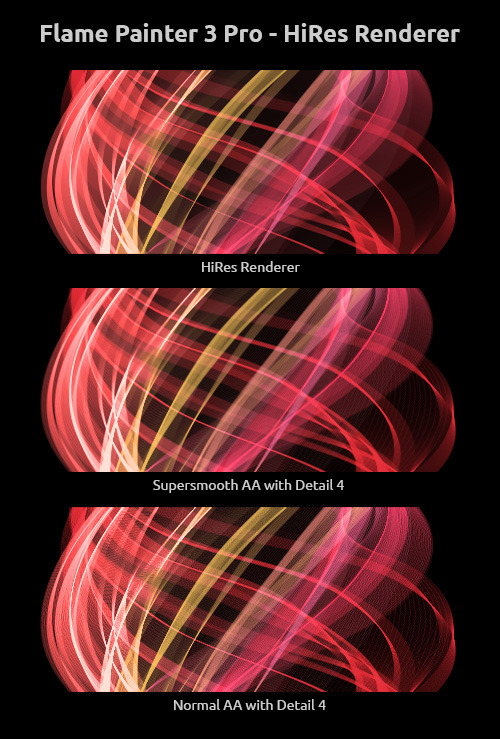
For those who need high-resolution images and even the SuperSmooth Antialiasing with the highest detail is not enough, we developed and included to Pro edition a new fantastic HiRes renderer. It fills the small spaces between dots and makes the picture nice and smooth without the appearance of Moire artifacts. If you work with vector layers, you can re-render them with this new state-of-the-art renderer.
Performance Speed Up to 200%
Do you have a multicore processor? Of course, you do… If you work with a huge canvas, a multithread engine optimization is a must. Both editions of Flame Painter will calculate the flames with significantly increased speed using the performance of all your processor cores.
Resize Image
A feature most of you will find really useful in both editions: now you don’t have to set your canvas size solely at the beginning of the painting, but also anytime while you paint. Bitmap layers will be scaled to the new size and vector layers will be re-rendered to fit the canvas.
Safe Boundary
In the new version, you can set an extended canvas with more visible space than the canvas you have for your painting. It is a very useful tool especially when you transform the layers often and need more space for manipulation.
Transform Layers
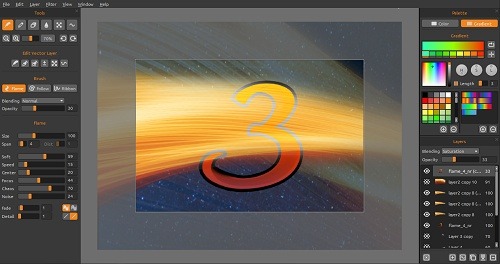
From now on you can scale, resize or move the layers to work on a particular area when it is zoomed.
Wacom Tablet Support
Tired of using a mouse? Now, in the Pro edition, you can have fun and draw naturally with a Wacom tablet or almost any other tablet which supports pen pressure sensitivity. In the Wacom Preferences, you will be able to choose which parameters should be influenced by the pen pressure.
Leap Motion Support
Tired of all the tangible tools you need for your painting? Throw them away! In both Personal and Pro edition, you need only your hands. Leap Motion controller allows you to use the motion control for creative expression in a whole different way. And we absolutely love it! With a wave of a hand, you can create beautiful results and not only the canvas but also the menu is fully accessible without touching the mouse. We believe, the nature of Flame Painter is suitable for exploiting this option for all the expressive control of tool options.

Copy & Paste
Users who use other graphic applications than Photoshop can easily Copy & Paste layers with alpha channel. From Flame Painter 3 Pro you just have to copy the layer and paste it to any third party application which supports image with alpha channel in the clipboard. This will work the other way around as well.
Unlimited Layers
Just like in Pro edition, users of the Personal edition will also be able to use unlimited layers instead of 3 layers.
These are the key features of the Flame Painter 3 release. So guys, which one do you find most useful in your workflow with Flame Painter? You are welcome to share your opinion with us!
In the next blog and newsletter on April 22, we will talk about the pricing, licensing options and ways of how to upgrade to version 3 for those who purchased through our website or Mac App Store.
Stay tuned :-)
Your Escape Motions Team

What do you think?
0 Responses
0
Upvote
0
Funny
0
Love
0
Surprised
0
Angry
0
Sad
Sign in to comment!
Is the Wacom chisel tip brush nib supported?
Just waiting patiently for end of month and V3
Looking forward to the better high-resolution rendering and speed boost.
Next feature that I want? The power to make REAL FIRE do this! Love your product, though I feel like I'm cheating with it, ha (I do smoke/light painting photography).
Maybe we should send a pack of matches with the license ;D
Great features on this new version. Too bad i payed and helped support the developers so that the new customers can buy it cheaper than I. I had the same experience w another software that i deleted out of frustration.
Mario, we have a discount for existing users, so you will not pay more than others, just check your emails we will send when version 3 will be published.
Wow; the hirez smoother will definitely help with my Chihuly glass renders; well my glass renders in general. Definitely looking forward to the release Peter; making my hungrier. lol
:)
I tried to purchase the last version but could not locate the key and there was no phone number to call to try to straighten the problem out. I had one version in the past and enjoyed it. Hope you can find a solution to this problem for me.
Hi Dolores, please send us an email to [email protected], we will gladly help you.