



Dear friends,
today we are very pleased to announce the release of Flame Painter 3: new fresh and shiny upgrade with groundbreaking features such as Photoshop plug-in, HiRes renderer, Wacom, Leap Motion support and many more. We have been working hard for months, spending long days and nights developing, drinking loads of coffee and strong green tea but the result is worth it. We hope you enjoy it as much as we do.
Flame Painter comes in two editions - Personal for $29.99 and Professional for $89.99. We are pleased to announce a special discount valid for the first two weeks after the release: 66% off both Personal and Pro edition (when upgrading the same edition). The discount is available for all Flame Painter users. You can check the exact pricing in our previous blog post.
Compare the new features of Flame Painter 3 Personal and Professional editions:
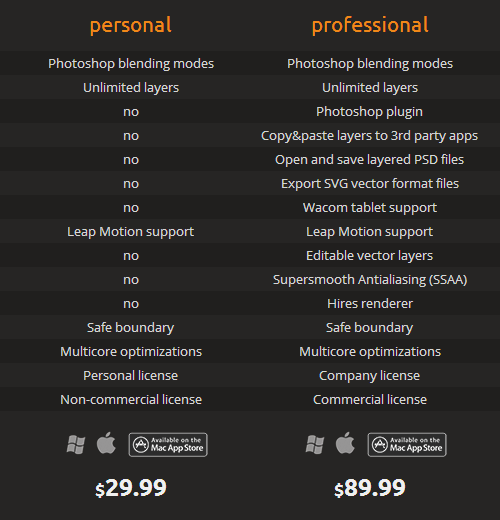
Flame Painter users can upgrade directly through Flame Painter 2.5.6 menu: "Help" –> “Upgrade to 3.0” or from our Upgrade page. Today we sent out newsletters as well - check your Inbox (possibly Spam box) to find it. Remember to grab when it lasts!
We thought, why painting programs have no trailers as movies have? If you would like to see how it would look, watch our super mega epic trailer created by Peter:

Note for Mac App Store users: Users who bought Flame Painter 1 and users who bought Flame Painter 2 Personal from March 1, 2014, please send us your iTunes receipt of the Flame Painter purchase with the visible purchase date. You’ll get a special discount as well. MAS users who bought Flame Painter 2 until March 2014 can upgrade directly through Flame Painter 2.5.6 menu: "Help" –> “Upgrade to 3.0”.
Bugs are unfortunately always a part of developers’ life. If you experience anything unusual, please send the problem’s description or crash report along with your system specification at our support email: support[at]escapemotions.com. We found out that we have a bug in Flame Painter Plug-in for Photoshop CS5 - we are currently fixing it so it will be available soon. Plug-in for Photoshop CS6 and CC works smoothly.
We would like to follow our progressive way and implement more features continuously. New features that you can enjoy in version 3 are not the definitive ones. As always, we carry on evolving our inspirational ideas which we intend to include in the next updates. These will be of course free for Flame Painter 3 users.
We cannot wait to hear your feedback and opinion!
…and the most important: Stay creative!
Your Escape Motions Team

What do you think?
0 Responses
0
Upvote
0
Funny
0
Love
0
Surprised
0
Angry
0
Sad
Sign in to comment!
Flame Painter Pro 3 is crashing while trying to do a hi-res render. Especially when detail is at 3 or 4. I am using Win8.1 with 16gig RAM and an Intel i7 Haswell-E 6 core CPU. Image size 2500 x 2500
Hello Charlie, thank you for your message. Please write us at support (at) escapemotions.com, we will send you a special version that will help us find the cause of the crash. Thanks in advance!
Hi Peter...
Any progress in Wacom W7 64 Issue -
you know - FP doesnt work properly with Wacom Intuos
Waiting for an Update
THX
Hello Frank,
Wacom issue is now fixed - please re-download a new version from Flame Painter's Download page (it still says 3.0.0) and let us know if everything works fine now with your Wacom.
Thank you very much for your patience and wish you a great day!
Peter
Hallo Peter ...
Now everthing is allright - cool.
Works like a charm
THX and go on with this wonderful Proggie :-)
So, any updates on the progress for that CS5 plugin? I was really, really looking forward to that. Otherwise, there is a lot of saving and opening and re-saving going on... makes it basically too cumbersome to use... and I really want to use this.
Awaiting news patiently in PA, USA.
Hi Mitch, we found a problem, some versions of CS5 (and also CC, Adobe has probably a bug in plugin code) behavior differently than CS6, so we found different solution. Plugin for CS5 will be published this or next week.
Cool - thanks!
Is the Wacom chisel tip brush pen supported?
I don't know where to discuss feature requests, but was wondering if it would be possible to add a mirror drawing feature (2 quad, 4 quad, 6, 8, 12). Would make creating some wonderful rosettes child's play. Maybe too hard to implement. Not sure how FP's engine is set up to be able to add features such as this. Again, definitely appreciate the effort over the years with Flame Painter Peter. :)
I sent an email to support on the 30th. I am having trouble with your server and it accepting payment. The cards are not the problem (checked with bank) Trying to upgrade to V3. received server errors on the 30th, but today declining all my cards (almost laughable).
Great new features in the Pro edition! But I miss the option for size in the preferences for the Wacom Tablet. Is it possible to add it?
Size is not possible to change on-fly, because it is fixed on flame brush character. But maybe we find once a solution.. :)
Bug when export vector that has no fill (the lines preset brush). When exporting, Flamepainter crashes.
Thank you, it is a bug, we'll fix this.
Just purchased the upgrade. Like the supersmooth feature, but currently, Inkscape is having a problem handling the SVG files (GIMP seems to be able to open the file but get some moire issues). My machine is old though and I only have 6Gs of RAM. Might need to now upgrade my 6 year old PC. lolol
:)
Hirez is awesome; usually I have to do some anisotrophic smoothing inside GIMP; now I don't and there's none of the issues that go along with doing so now with the output. :)
http://imageshack.com/a/img...
V3 probably won't work stand-alone with OSX 10.5.8. But would the PS CS 5 plug-in work independently and separately within PS if i upgrade to the pro version to get it?
Flame Painter is a standalone program. We developed a Plug-in for Photoshop which communicates between PS and FP. Plugin for Photoshop CS5 will be available soon for all existing FP3 Pro users.
so i couldn't use the plug-in through PS unless is could talk to the stand-alone program, which means neither will work under 10.5.8 then?
Flame Painter works independently of Photoshop, it is a standalone program and works for Mac OS 10.5.8 too.
Flame Painter Connect is a Photoshop plugin, which is dependent on Photoshop and is a communicator between PS and FP. Works only if you have Photoshop CS5, CS6 or CC installed. If you don't use Photoshop, you don't need it. At this moment it works for CS6 and CC, for CS5 we are going to launch it soon.
Hi Peter
Thanks - i have downloaded it now -
and installed it -
but ...
there is an Issue with painting with my Wacom -
when im using the Pencil of Wacom -
the Cursor in Flame is often interrupted and stand still
stands on one position -
it doesnt move smothly like in Flame 2 Pro .
With the Mouse no Problem -
the Driver from Wacom is the latest and newest.-
Wacom is Intuos 3
Need suggestion - what to do - that i can paint with my wacom -
otherwise its useless for me.
Greetings
Hello,
thank you very much for your feedback.
Could you please let us know your system specifications? We are now working on fixing this and would need your specs to proceed.
Thanks!
Hi Peter
Win 7 Ultimate 64 - I7 2600K - 32 GB Ram - Nvidia GFX 460 - Wacom Intuos 3 -
hope this will help you :-)
With Wacompaint it stops flaming ,
stand still at one Point - jump to another point and sometime it make nothing
HiRes is always crashing
THX
My Wacom will not paint, but controls do work. Tried v.2.5, and Wacom works. Mouse works with new version. When next version arrives, I will wait a few weeks before I purchase. This v.3 Pro just was not ready.
"We found out that we have a bug in Flame Painter Plug-in for Photoshop CS5 - we are currently fixing it so it will be available soon. Plug-in for Photoshop CS5 and CC works smoothly."
I hope you realize I'm easily confused ;)
However, I'm guessing that you need to change CS5 to CS6 in the last sentence.
Oh, and congratulations on the release. It is awesome!
Thank you, we fixed it, it should be: CS6 and CC works smoothly. We found a bug in plugin for CS5, it works from Flame Painter to Photoshop, just have to make some minor bug-fixes and release it without problems.