


Soon to be released Flame Painter 4, a new edition of a standalone paint and particle effects package will include amazing new brushes, particle systems, and an advanced Brush Creator panel. In today’s blog, we’d like to introduce the next big improvements that will make you enjoy working with Flame Painter more than before, including the Import of vector paths, Symmetry tool, Canvas Size & Transform tool, Navigator panel, Filters menu and more.
Import Vector Paths
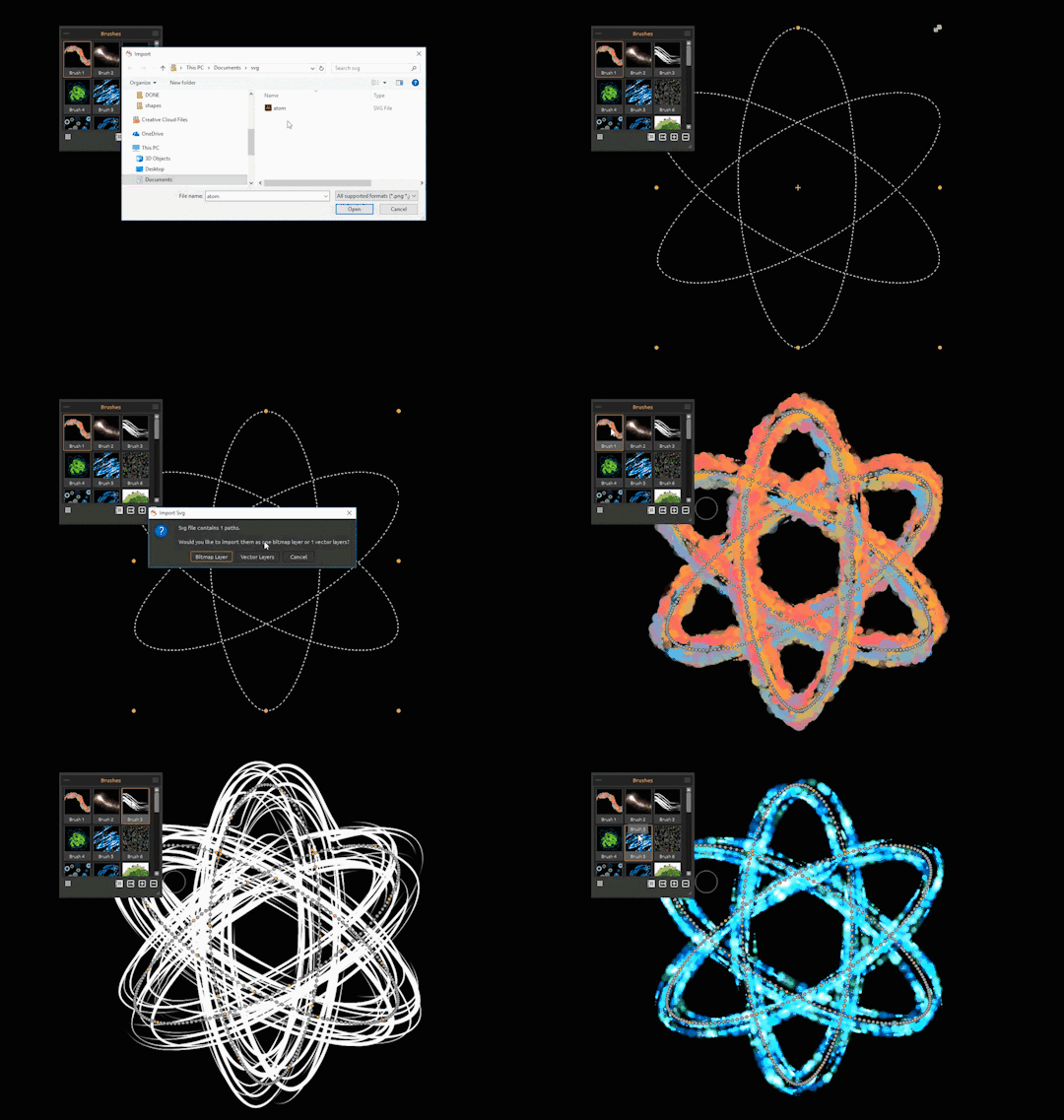
Groundbreaking feature for the next Flame Painter release is the import of an SVG file - either to one layer as a bitmap or to multiple layers as a vector which can be further edited according to your needs. Switch between brushes, edit the brush in Brush Creator or select different colors or gradients to match your specific design. The brush strokes will be applied to the imported vector paths automatically. This will make designing your project extra fun and speed your workflow up. Well, as long as you don’t lose track of time while trying all the amazing possibilities that exist :-)
Symmetry Tool
Flame Painter 4 will feature a new tool for creating symmetrical designs. It will be super easy to create beautiful symmetrical artwork with any brush using only a few paint strokes with your mouse or tablet pen. Follow your artistic intuition and choose different colors or gradients to produce a fascinating scene. And to enjoy this tool more, paint the shapes on a vector layer and watch the design update while switching between various brush presets, particle systems, colors or gradients.

Advanced Palette Panel
The advanced Palette panel in Flame Painter 4 will give you many new options for your work. You will be able to choose any Color from the Palette which can be displayed as RGB, HSL, HSV, or HSLuv. Moreover, you can choose from the default list or create own beautiful Gradient transitions for your brush preset and apply them on the stroke, lines or dots, based on what engine your brush preset was created with. Finally, set how many times the gradient should repeat on the stroke and in what direction - either on length (horizontally) or width (vertically).
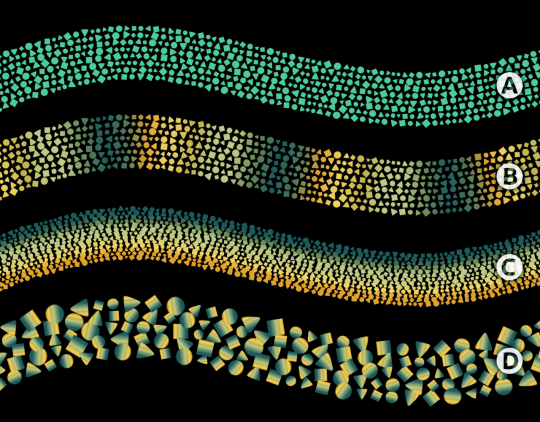
( A ) - Single Color, ( B ) - Gradient on Length, ( C ) - Gradient on Width, ( D ) - Gradient on Dots
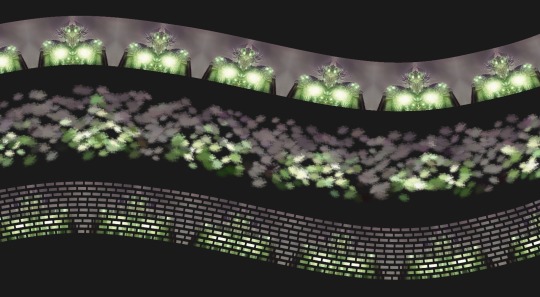
Lastly, you can choose to apply the palette from an Image - this option lets you import your own images. The image will be mapped on the stroke, lines or dots and can also be repeated on both length and width of your strokes.
Canvas Size Tool
Previous Flame Painter versions were missing a few tools which forced artists to switch to Photoshop repeatedly in order to get things done. One of these was a tool for resizing the image. Luckily, Flame Painter 4 will introduce Canvas size - a new tool that will serve for cropping, scaling and resizing your work. Resize of the canvas in Flame Painter 4 has been designed to be very easy and interactive - resize by using the control points, or by entering the desired size of a new canvas in the edit boxes. You will also be able to resize the image and change its DPI accordingly. The size of your canvas in Flame Painter depends only on your computer’s memory.
Pick Color Tool
Another new tool we’ve implemented to Flame Painter is the Pick Color tool. Now you can pick colors either from your photograph to match a specific palette or from your current layer or all layers. You will also be able to set a sample size here.
Selection Tool
The next convenient feature in Flame Painter 4 that will make your switch to PS less regularly will be Selections. These are going to help you select a specific area of the canvas and perform operations on this selected area. There will be various types of selection tools available: rectangular, elliptical, polygonal and freehand.
We’re also adding the Magic Wand that will create selections based on the tone and color of the pixels. You can specify the Tolerance, Antialiasing, Contiguous selection, or Use Alpha channel. Tolerance determines the color range of selected pixels, Antialiasing creates a smoother-edged selection, Contiguous selects only adjacent areas using the same colors and Use Alpha determines the alpha channel of selected pixels from the background.
Filter Menu
Besides Tile, Glow, and Blur, our development team has implemented standard color adjustments settings to Flame Painter 4 under the Filter menu. The new filters include:
- Brightness / Contrast, Hue / Saturation / Lightness
- Color Balance, Color Filter, Colorize
- Desaturate, Invert
- Black to Alpha, White to Alpha
You will find the last set of filters ‘Black to alpha’ and’ White to alpha’ very useful, especially when you import a picture with a background you want to get rid of.
Improved Fill Tool
The improved Fill tool in Flame Painter 4 will be able to fill not only the whole layer with the selected color or gradient but also the already painted strokes. Internally the stroke will be selected with a magic wand tool according to its color, then the chosen palette will be applied on this stroke with one click.
Improved Transform Tool
We’ve improved the Flame Painter 3′s Transform tool to the new version - it now enables you to move, scale and resize the selected layer or layers. We’ve also added the possibility to rotate layers or selections and flip them horizontally or vertically using one single click or shortcut.
Photoshop Plugin
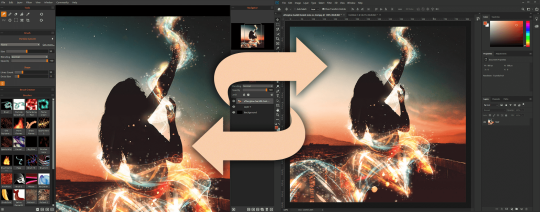
Flame Painter 4 will feature an updated Photoshop plugin - Flame Painter Connect - for exchanging layers. Export layers back-and-forth between Flame Painter and Photoshop quickly and easily.
Other New Features
• Navigator panel to quickly change the view of your artwork using a thumbnail display.
• Drag & drop to easily drag & drop brushes, gradients, images or files directly from the web browser or file manager.
• “New Artwork” window with multiple default size presets available and the possibility to save custom presets in centimeters, inches or pixels with custom DPI.
• Lock in Layers panel in order to lock a layer to prevent it from any unwanted changes, and lock transparent pixels of a layer.
• Preferences panel to set the General, Tools, Tablet and custom Keyboard shortcuts preferences.
Pricing & Availability
Flame Painter 4 will be available on our website next week for the full price of $89.99 USD. All existing owners of Flame Painter are eligible for more than 50% discount - regular upgrade price will be $39.99 USD.
Users who purchased Flame Painter 3 within the last three months, i.e. from March 1st, 2019 will be eligible for a free upgrade.
Moreover, with the release of Flame Painter 4, we’ll also release three particle systems Liner, Fuzzy and Elastic as add-ons on our website. The particle systems can be purchased for $19.99 USD each. All three particle systems will be bundled together for an introductory price of $39.99 USD.
Next week, we will send out newsletters with more information on how to upgrade - definitely check your Inbox so you won’t miss it!
By the time, let us know in the comments what new features you’re looking forward to the most and we’ll pick another winner who’ll get a free copy of Flame Painter 4!
Your Escape Motions Team

What do you think?
0 Responses
0
Upvote
0
Funny
0
Love
0
Surprised
0
Angry
0
Sad
Sign in to comment!
Hi guys, thanks for all the love! We've chosen Steve Bucci to win Flame Painter 4. We’ll be releasing this beautiful software soon to all of you. All you have to do is wait for a newsletter to land in your Inbox. :)
Bless Peter for creating the gem that is Flame Painter. While I own and had fiddled in FP 3, I somehow lost touch with it. The recent announcement of FP and all the features makes me giddy like a kid in a candy store :-) Along with the existing feature set of FP 3, the import vector path and symmetry tool have lots of possibilities - stress busting, abstract art, spending time, therapy...
The Vector paths is an important upgrade to me. I've collected a large library of Custom Shapes in Photoshop. The ability to use those shapes in Flame Painter is a great option. Looking forward to the Photoshop plugin as well.
Can you capture animations?
Capturing animations will not be possible, only with 3rd party software.
Hi ! One suggestion : a CACANi Plugin would be great !.. CACANi is a vector animation software that can import SVG files ... It has his own file format : CACS https://cacani.sg/ I've made a wish... ????
Looking forward to the new release; looks great! Hopefully it still has Leap Motion control - perhaps expanded and with some midi or key mapping options for colour and brushes. As I’m experimenting with using it as a live performance tool, and the Leap Motion is great for that, especially with output through Spout/Syphon (any chance of that built in too?) to COGE VJ.
In this version we removed Leap Motion controller, because we had different complications with it, but if there will be interest among users, we consider to implement it back.
Oh, I'm definitely most keen on the Leap Motion as my ipad is tied up with drawing and animating.
Any key shortcuts, particularly tabbing through the brush selections and through colour hues?
There are shortcuts for changing color hue, saturation and brightness. We can try to implement shortcuts for brush selection - sounds like a good idea :)
Awesome, those key shortcuts are great! Please please bring back Leap Motion support though, that's my big must-have!!
Color shortcuts are great, and I see some brush options too! ButI'm most keen on LeapMotion (or midi input which will do the same thing) ...
Looking forward to the symmetry tool. There is potential for mandala-like creations.
I have the “Inspirit” and “Flame Painter” apps on iPad and this is shaping up to be an epic combination of the two :)
With brushes available in FP4, I myself created very beautiful mandalas, you have to try it! :)
I've been a user since the first version....this release is exciting to me!
I have to say that among all the great "giant steps forward" the Photoshop plug-in feature is near the top of my new favorites but the Magic Wand hits a Home Run for me. I'm looking forward to the upgrade. It almost comes across as a whole new program!
Looking forward to the updated Photoshop plugin, as well as the symmetry tool. Everything looks amazing. You folks have been very busy making V4 the best yet. Wish your timing had been a bit earlier, but waiting another month till I can fit into my budget just means I need to plan out my discretionary funds better. :)
Thank you Louis! :)
Can't wait !!
Looking forward to an updated Photoshop plugin! Since I use Flame Painter with my photography, that's going to make my workflow so much easier! :)
Looking forward to it.
Yup, I'm with @A@annamccullough:disqus. Vector paths ... However It's hard to decide what to love more! Maybe the one is Symethry tool great too although this part is available in Insprit aswell. Looking so much forward to this new version!
Thank you Tatjana!
This upgrade is going to be major! The Symmetry, Selection, Color Picker and Advanced Palette are all key for me.
Vector paths? VECTOR PATHS! That's worth the price of the upgrade all by itself but it looks like y'all have packed this version with all sorts of goodies - the particle system looks gorgeous!!
Oh wow, it is getting way better! I love the advanced palette panel and I am eager to try it. It is a great step forward for Flame Painter.
looks amazing! Flame 3 has been great but this looks like a huge step forward. can't wait!
I thought I was looking forward to the particle systems the most, but the import vector paths looks sweet, too.
Hi Steve,
thanks so much for your amazing support. We would like to choose you as the lucky winner of the upcoming Flame Painter 4. Please send us an email at support [at] escapemotions.com - after Flame Painter 4 is released, we'll send you a full version.
Thanks and cheers!
Whoo!! Can't wait! Thanks, Peter!
Wow! I was excited about all the new brushes, but these new features, applying gradients and images, vector paths and symmetry put this over the top! I can't wait for the release now :)