

In our last blog, we announced a new Rebelle 2 with Stencil & Masking tools. Today we’ll talk about other changes and additions you can expect in the new upgrade: Selections, PSD support, Faster Save & Undo and more.
Selections
Selections will be a part of Rebelle 2, you hear well! :) Selections serve as a masking tool that blocks off the areas of the canvas you do not wish to change. It's clear that these tools are essential for digital artists and decided to add selections to this new version. From Rebelle 2 you will be able to select a specific area of the canvas and perform operations only in this area. There will be four types of selection tools available: rectangular, elliptical, polygonal and freehand selection.
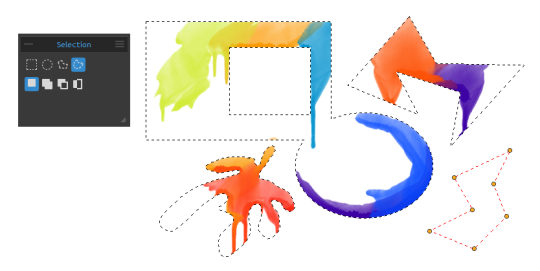
With three different modes, you’ll decide how multiple selections should behave - you can choose between New Selection, Add to Selection or Subtract from Selection. ‘New selection’ will replace the current selection with a new one, ‘Add’ will add a new selection to your already created selection and ‘Subtract’ will remove the area of the new selection from your current one. You can easily switch between these modes using keyboard shortcuts - Shift for adding and Alt for subtracting from the selection.
You will also be able to transform selections and move, rotate or scale the selected area. You can also cut, copy and paste the selected area of the canvas either via the Edit menu or with standard Ctrl + X, Ctrl + C, Ctrl + V keyboard shortcuts.
The most important is that the watercolor diffusion interacts with the mask, select the part of the canvas where you want to paint or invert the selection to make sure no paint is added to this area - just like you would with a simple masking tool. This is not the end - you can create a stencil from your selection as well! We’ve managed to get the stencil and selection modes to work together and from Rebelle 2 it will be possible to easily select an area of the canvas and save it as a stencil for future reference.
Lock Transparency
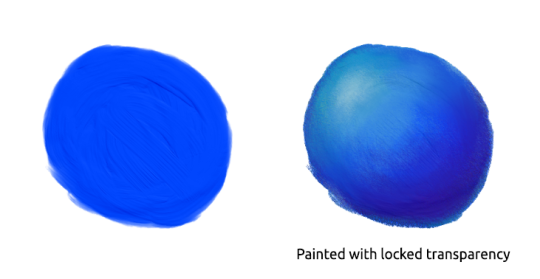
One handy feature in digital painting very similar to stencils is Lock Transparency or Lock Alpha. When pixels’ alpha is locked no changes can be made on transparent pixels. Locking the alpha channel is a way of helping you not to paint outside the lines. It is a great feature when you work close to the boundary of an opaque object, for instance, if you wish to color borders of the painted object but you don’t want to paint outside its lines.
Layered PSD Support for Open and Save
Another great news is that with Rebelle 2 you will be able to import and export layered PSD files for Photoshop, Gimp or other bitmap editors supporting PSD file format - with all layer settings, blending modes and opacity.
Paint Structure Visibility Slider
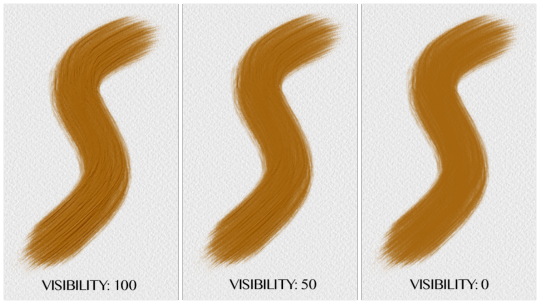
From Rebelle 2 you can set how much the paint structure should be visible on the canvas. The structure or bump map (normal map) is visible mostly on the Acrylic brush, now you can set it to even 0:
Faster Save & Undo
In the previous version, large canvases tend to get saved after a few seconds which is actually quite a long time when working with larger canvases. :) We dug into the code, did a little magic and made undo/redo and saving of .reb files a lot faster!
Create Color Set from Last Used Colors
Very handy features for those who use many colors during their painting - in Rebelle 2 it will be possible to create a color set from colors you used in the current session. Of course, you will be able to rename this color set or set it to the desired order.
What features are you looking forward to trying the most? Let us know in the comments! This Thursday we’ll be talking about the new brush engine and other features that are planned for the major upgrade, make sure you don’t miss it. :)
Your Escape Motions Team
----
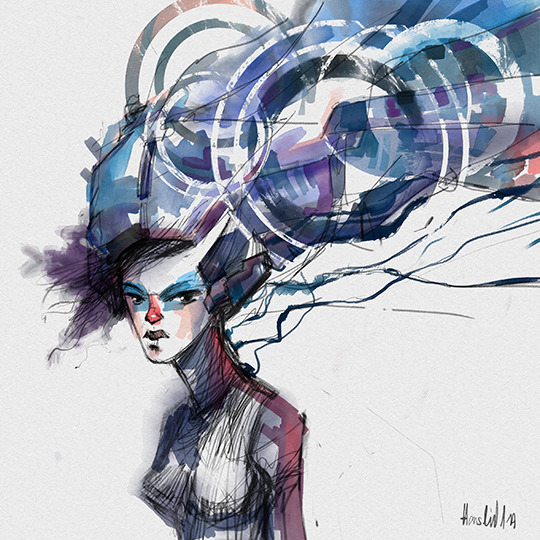
Image Courtesy: Martin Hanschild | matohanschild.tumblr.com

What do you think?
0 Responses
0
Upvote
0
Funny
0
Love
0
Surprised
0
Angry
0
Sad
Sign in to comment!
Is there a way to add new shapes for brushes?
Hi, yes you can add new brush shapes to Rebelle 2 - either click on Shape thumbnail in Brush Creator panel or go to menu: Help -> Show Library folder and select "Shapes" folder where you paste your own shapes in .png (best), .jpg or .bmp format.
Am I the only person experiencing rebelle 2 crashing? I have two windows 7 Pro. 64bit systems and rebelle 2 crashes on both. Since installing rebelle 2, it has not worked. I have not been able to paint a single brush before it quits. An email was sent to support since V.2 release about my problem with no response to date.
Hello Creationz. We are working on this issue, we have to fix this, it happens on some computer configurations, maybe connected to graphics card. On some computers it works flawlessly. I am very sorry for the inconvenience, some bugs are not easy to solve. Thank you for your patience!
I sent an email reply with a screen shot of what I see when Rebelle crashes. Is there any time frame as to when you might have a fix ready? I have projects that can use Rebelle 2 new features.
Same problem. I own a MacBook Pro medio 2009 Intel Core 2 Duo Processor 2,8 GHz. System El Capitan. Also not been able to paint. Have send a crash report too. Hopefully they can fix this.
The demo works fine on my computer but it does no justice to what the full version has.
Hi there!
Please go to C:\Users\YourUserName\AppData\Local\Escape Motions\Rebelle 2 and delete the whole "Data" folder.
On Mac OS the path is: user/Library/Application Support/Escape Motions/Rebelle 2
Then run Rebelle 2 again (you will need to enter your registration details).
How does it work now?
Peter
Works great! Thnx
That did the trick. Thank you.
It worked for a while but unfortunately the crashing has returned. Rebelle works as long as I keep deleting the data folder but crashes soon after several uses.
I have one comment in the new edition so far... it would be great if we could OUTLINE the stencil image in the inversion mode.
Yes I would love to see this feature too, it is in our to-do list.
Yessss! Photoshop import & export. Awesome ♥ so excited to try out the new features.
Hi peter. One thing I struggled with since v1 is the apparent lack of advice / training available for rebelled users. Could you make some you tube videos or even a user manual. To accompany the new version please.
I know, we have to work on this. I hope we prepare some tutorials soon. You can open the user manual from menu -> Help.
Really looking forward to trying out the new features, especially the masking! Rebelle has the best watercolour simulation I've ever come across...it's a great app...thanks for making it even better!
(PS would also love it for iPad Pro!)
Please please make a Rebelle for IPad Pro. Please? ????
I am not so hungry for PSD support, but the selections look promising. Did you consider doing the "magic wand" - selecting similar color? Also selecting everything not transparent on a layer would be handy. Thanks for your great work!
That would be definitely possible in one of the next versions.
"The most important is that the watercolor diffusion interacts with the mask, select the part of the canvas where you want to paint or invert the selection to make sure no paint is added to this area…"
Will it be possible to have the selection respect the original brush stroke but allow paint diffusion over the selection border?
That might be quite useful to lend an impression of 'hand painted' even to a geometrical selection.
Not possible atm, but we may add this to the future Rebelle 2 updates :)
THANK YOU so much for the PSD file compatibility! Being able to use Photoshop layers is a game changer for me. I'm happy that I jumped on this train…
Thank you!
It would be great to have a tool to draw straight lines (as well as other shapes) and another one to choose the strenght of blending colors with the acrylic brush.
We have a plan to add this in the future. :)
Woo hoo! PSD support? Now that's going to open up a whole lot of new 'layers' of possibilities for drawing/painting AND workflows. And selection mask interactivity -- I"m already working out in my mind some things I want to try with that!
Here's a curiosity-based question for you Peter: did you guys consciously decide to avoid including support for devices that provide a stylus tilt data channel? I can understand why, from a marketing standpoint (tilt units are just a fraction of the whole potential stylus market), and I have to say that your simulations are still dang lively without the tilt thing. But have you toyed with that idea at all?
Your thoughts?
We're working on this feature, Bob! :)
This looks very cool indeed - just checking because I haven't it included anywhere - if I already own Rebelle, do I have to pay for this upgrade? Or is that information released when the product is?
Hi Stacey, we'll release more info this Thursday. Existing users of Rebelle will have a significant discount, as always. Stay tuned for more info tomorrow. :)
Wonderful prospects. Good luck, Peter. Exciting features here.
Thanks, Tim!
Yes, yes, yes!!!
Lol, I can't remember the last time I was so stoked for a "mere software release" =D
Regarding the new selection functionality...
will it be possible to(just like in Photoshop) Ctrl+click the thumbnail of a layer in the layer palette to get a selection around the content on that layer?
Please say yes, please say yes... x)
I didn't know this is possible in PS :) but it shouldn't be problem to add in one of the next versions.
It is a real time saver and extremely handy when creating complex selections and compositions in PS.
Squeee!! Crossing all my lil fingers and toes =D
ok... finally PSD suport. a bit late though. I'm not very happy that you
didn't integrate this in version 1 and if I want a usable software that
I can integrate in a production pipeline I have to buy version 2 as
well. it's a marketing strategy, to convince people to upgrade. like the
lock transparency, basic editing.. essential functionality that you'd
expect from a 1.0 of any graphic app. I'm sure you have more essential
updates for version 3.0.. I'm gonna wait until at least version 10.0
though : ] just to make sure I don't keep buying again and again..
waiting for basic functionality to be added to Rebelle
Thank you for your opinion, we appreciate it.
We're sorry you are missing some features in the application, but it is completely understandable. However, please note than Rebelle's first usable version was only released in 2015 therefore it may be considered a novice in the field of painting applications and still may lack some of the tools that are granted in other, much mature software.
Our plan is to keep developing and adding new features along the way while improving the existing ones.
OOOHHHHHH SWEET! As much as I loved your system I did find it lacking in the layer manipulation area. The way you replicated the mediums overshadowed the downside. But you've just implemented fixes for even those things. Beyond excited to play with it now.
Is it out yet? Is it out yet? Is it out yet?
Thursday we reveal when it will be released!
What I most of all would like to see is pressure sensitive size of brush like in for example Photoshop so that we can create brushstrokes that go from thin to heavy. I think this is necessary to simulate real watercolor and the main thing that hold me off embracing Rebelle fully.
I'd also like more and larger brushes and the possibility to create your own from an image.
Wait for blog in Thursday, I think it makes you smile :)
I cannot believe my eyes. Do we really get size variations with pressure sensitivity? Excellent! I was really missing that.
Beyond exciting! Wonderful work, Martin. T
will this be a free update for those of us that just bought Rebelle?
Rebelle 2 will cost more but all existing users will have discounted upgrade as always. If you bought Rebelle within last month before the release you will pay just a price difference.
I bought it April 1st,for both PC and MAC. Do I get a really good discount?