

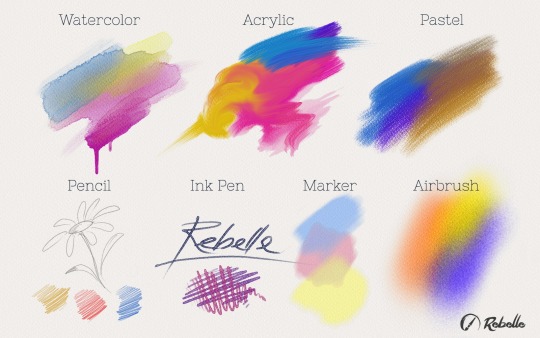
As proof we are working hard on Rebelle's development and don’t sunbathe in this hot sunny weather that arrived in Slovakia, we are bringing you an update with new improvements and 7 new brush presets: Watercolor, Acrylic, Pastel, Pencil, Ink Pen, Marker, and Airbrush:
Get the 0.6.0 update from our Download page and share your feedback with us directly from the menu: “Help” -> “Send Feedback”. The update is free for all users who pre-purchased Rebelle.
Try out this unique watercolor and acrylic painting tool among the first people in the galaxy with a 33% discount:
Regular price: $59.99 | Pre-purchase: $39.99
Try the Demo version or purchase Rebelle here. More information is available in our previous blog post.
Have a sunny weekend!
Your Escape Motions Team

What do you think?
0 Responses
0
Upvote
0
Funny
0
Love
0
Surprised
0
Angry
0
Sad
Sign in to comment!
Hi, I just bought rebelle and I found it fantastic most particularly the watercolor. I just noticed that mixing two or more colors doesnt really mix them. Example is blue and yellow, using the smear produce very little green, almost no mixing of colors. It seems we only drag the colors anywhere we want but not mixing them. Another thing, when I tried to save the painting in TIF format, the layers were flattened. It seems the watercolor dry fast, will it be possible to have some sort of settings to set the drying time longer?
Hi Peter,
it depends which colors you mix and depends on which media you use, if it is deep blue and yellow, you should not get green, but muddy color:
http://www.johnmuirlaws.com...
If you mix, light blue (cyan) with yellow, you should get green. I created a color chart in Rebelle:
http://www.escapemotions.co...
But I think it depends on media you use, so maybe with some watercolor you get green.. do you have some picture or example?
To your questions: Tiff format saves only one layer. We have a plan to add option to set a drying time.
About the Tif, I created two layers in rebelle then save the file to Tif format, then open that tif file inside photoshop and found out that it only contain one layer, meaning the layers were flattened. Ok, I got your point in color mixing, I think I should point on the smearing feature of the software, I just made blue and yellow as example in fact any color leads to similar effect. In smear, whenever I smear two colors in a way similar to mixing them, Doesnt it should mix together? What I see is that its more on dragging the colors in any direction we want and very little mixing. I hope I am clear here. Sorry for the confusion about mixing, its the smear that I am pointing to.
For mixing it is better to use Blend tool, smear is really more for dragging colors on canvas, but maybe we add some blending to smear too.
Rebelle doesn't support layered tiff files (at least for now). For layered photoshop file you should save your layers one by one (closing layer visibility) in png format, and then collect this layers in photoshop. You can also export canvas layer with this method, but the final result won't be same with Rebelle. I think canvas layer has a special blending mode in Rebelle.
I'm not very happy particularly with pastel, marker and airbrush tools in v.0.6
Pastel:
Even with %1 pressure we can cover all the canvas texture. It's not real behavior.
Marker:
I think with every stroke of the marker, the color must be more darkened. With current marker I can't reach the tonality of the color chosen.
Airbursh:
It's a tool, to paint you don't need to move your hand. Enough to press the trigger. If you spray continuously in same place, you create a type of splash. Airbrush sprays in conical form. For real airbrush (and for pencil too) we need tilt support. When you tilt airbrush, it sprays conical, and the canvas texture is very effective like in watercolor. And the other important thing for airbrush is the liquidity / transparency / opacity of color used.
By the way, I'm in love with the way that Blow tool in online version of Rebelle works with Right Mouse Button shortcut. In the wacom settings / options "Side Switch Mode" I've selected "Hover Click". In this way I can use my wacom pen, pressing side switch like the trigger and without touching the paper/tabletsurface, like a real airbrush.
And the last thing: Brush movement smoothing algorithm is somewhat problematic. (Last minute edit: This problem seems to be caused by my configuration. Mac Mini late 2012 with 16 gb ram)
Hello Cetin,
Pastel: could you please make a screencast video of the issue?
Marker: sure, understood. Marker is not in the final version, we'd like to modify its behavior
Airbrush: thanks for the feedback, we'll consider airbrush tilt for future updates
Regarding the smoothing algorithm, we have been working on this and made some changes, which we'll include in (maybe already) next update.
Hi Peter,
Video for pastel problem: https://dl.dropboxuserconte...
and the custom brush file used: https://dl.dropboxuserconte...
Hi Cetin,
please find reply from us at your email address.
Peter
Thank you very much, with version 0.7 smoothing problem just resolved. Marker's behavior is now more accurate, but in my opinion applied lighter colors can't lighten picture, because markers are totally transparent.
Love so much about Rebelle!! Thanks for the new brushes and other improvements.
My PC has less than the minimum requirements, so it gets incredibly slow. If I save very regularly it helps a lot. The down side of that is that I lose the "un-do's" but that's acceptable. Still a wonderful program. Will be updating soon, looking forward to the new brushes.
Mix is a great future.
But if we haven't a shortcut for next step, every time we have to go canvas and then to color palette. Please give us a shortcut (maybe 0 to 9) that with 0 switch color to foreground, with 9 to background (and 1 to 8 intermediate color values.)
Who didn't take notice: Choose a color and activate mix. Every time you click on the target color your color will approach one step to target color (totally 10 steps).
(Sorry for my english.)
I downloaded the update, installed - but when I do Help>About, it still shows as version 5.0. I then uninstalled everything, reinstalled - same thing, shows version 5. What gives?
Hi John, if you look at the bottom of Tools panel on a left side, it shows the correct version, it should be v.0.6. In About dialog is not a correct version, I am sorry for confusion (you found a bug - thank you! :) )
Peter - thank you for replying. You are correct, it shows version 6. Program is fantastic! Thanks again.