


From our previous blog posts, you already know that the upcoming Rebelle 2 will feature many useful additions such as stencils, masking tools, selections, PSD support, faster save & undo functions and more. Today we’d like to introduce other improvements that you can expect in the upcoming version - a completely redesigned brush engine.
What you (and we) missed in the first Rebelle version were without a doubt more brush options - shapes, pressure settings, textures, the ability to create custom brushes, and so on. These possibilities are available in every good painting software and we absolutely understood your desire for more control over the brushes. However, because of Rebelle’s sophisticated watercolor simulation, this was a huge and quite complicated task - for this purpose we have been redesigning the whole brush system for the past year and are proud to announce that Rebelle 2 will feature a new brush engine that will push your painting process to new creative heights.
Custom brushes
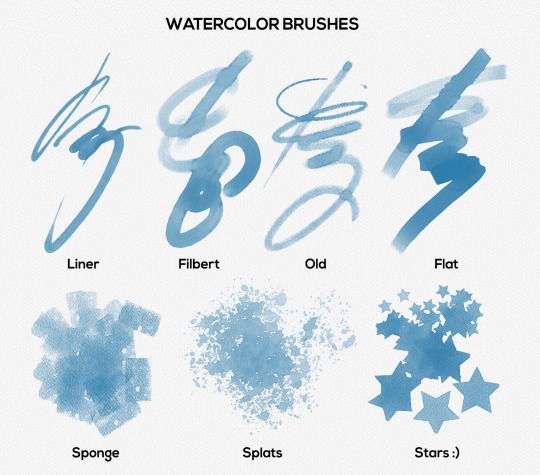
From Rebelle 2 users will be able to create custom brushes via the Brush Creator panel where you can choose from various brush shapes and grains. Amazing addition that will help you create unforgettable artwork are many new brush shapes - flat, bamboo, triangle, hexagon, square, star, sponge… you name it! There are many default brush shapes and grains implemented directly to Rebelle but you can easily add your own.
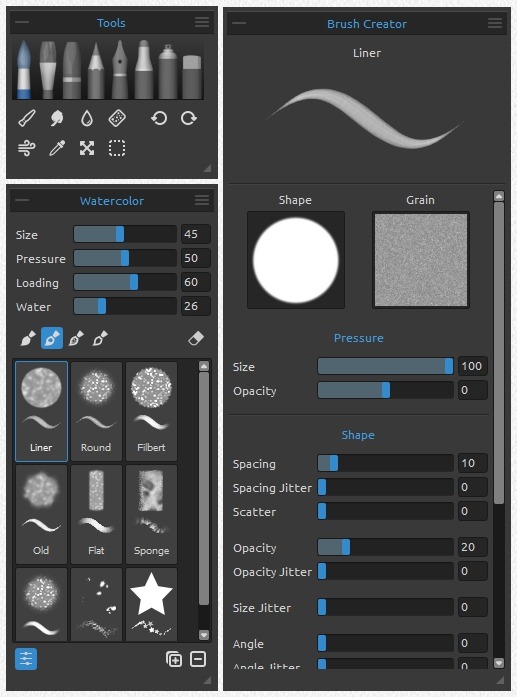
Many of you asked us to implement pressure support that influences the size of the brush. Drumroll, please - your prayers have been heard! In the Brush Creator panel, you can set the influence of the pen pressure on brush size and opacity and create nice tapered brush strokes.
Brush creator enables you to set many different shape and grain settings including spacing, jitter, scatter, angle or scale. You can also set whether the brush should follow the rotation on canvas or not - this is especially handy when working with flat brushes.
In the first Rebelle version, our main focus was to create the most natural watercolors. It is a real challenge to simulate watercolor behavior in a digital form because it has many nuances and subtle details which makes it so specific. In the second Rebelle version we made watercolors even more creative, but also focused on other tools, especially acrylics which got an extraordinarily realistic look.
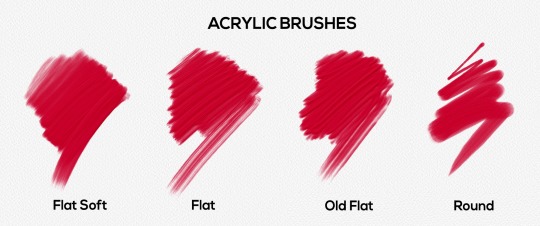
Basic settings for brushes in the Brush panel are coupled with other new improvements - you can name your brushes by double-clicking on the brush name or change the order of brushes as well as duplicate, remove and reset the brush preset to default values. Rebelle 2 also comes with the possibility to import, export and share your own brush presets directly from the user interface.
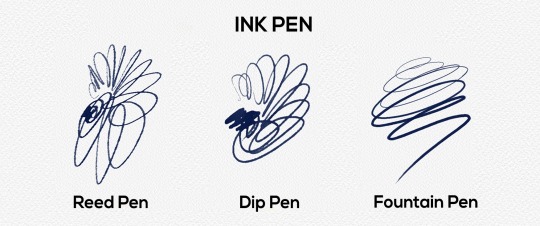
What’s more, now every brush can be used as an eraser. Such brush works as an eraser but a bit differently - it removes the paint from the canvas based on the brush settings just like in the world of traditional art when a clean brush is used for removing the abundant mass.
Change Brush Size on Canvas
In this new version, it will be possible to change the size of the brush directly on the canvas with quick shortcuts. Use Ctrl or Cmd + left mouse button and drag to the right to increase, to the left to decrease the brush size.
Experimental GPU Engine
In Rebelle 2 we included a setting to switch to -yet- experimental version where brushes run on our new GPU engine. The main reason we are developing such an engine is to secure that Rebelle 2 will handle large resolutions with larger brushes. It is still in development, but if you have a dedicated graphics card you can set Rebelle to run on GPU from the Preferences Panel. This engine is still unstable and may crash unexpectedly because it is for now only experimental. We would like to release a fully featured GPU engine in one of the next Rebelle 2 free updates.
New Possibilities for Water and Dry Tools
The new Rebelle version brings new possibilities for Water and Dry tools - you can create nice splatters and wet effects since these brushes can have various shapes and textures.
Pricing & Availability
Rebelle 2 will be available on our website from April 25th, 2017 for the full price of $89.99. All existing owners of Rebelle are eligible for more than a 50% discount - the regular upgrade price will be $39.99. Users who purchased Rebelle within the last month, from March 25th, 2017 will pay only the price difference between versions, which is $29.99.
Upgrading is optional and the upgrade discount will always be available. You can continue using your Rebelle 1 for as long as you like.
On April 25th, we will send out newsletters with more information on how to upgrade - definitely check your Inbox and Spam folder, so you won’t miss it!
System Requirements:
Minimum: Intel i3 or equivalent AMD processor, 4GB RAM, 100MB hard disk space, graphics card with 1GB RAM, Windows Vista (64-bit or 32-bit) or Mac OS X 10.8.
Recommended: Intel i7 or equivalent AMD processor, 16GB RAM, 100MB hard disk space, graphics card with 4GB RAM, 64-bit system Windows 7, 8, 10 or Mac OS X 10.9 and newer, Wacom or Surface compatible tablet.
With Rebelle 2 the revolution in digital painting continues. We believe it is a huge step forward to a new way of enjoying traditional methods in the world of digital art. We are now preparing, even more, features for the upcoming 2.x updates, which all will be free for Rebelle 2 users.
The countdown begins! Are you ready? :)
Your Escape Motions Team
----
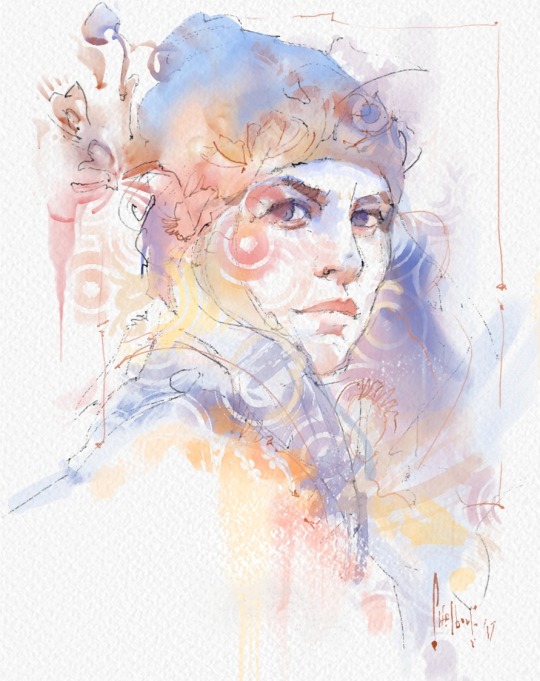
Image Courtesy: Tim Shelbourne | http://www.theartistsquarter.com

What do you think?
0 Responses
0
Upvote
0
Funny
0
Love
0
Surprised
0
Angry
0
Sad
Sign in to comment!
Hi, I am trying out the demo and I was wondering if it was possible to reach higher resolutions. It seems the memory maxes out at 4gb?
Hi Lloyd, the demo version is 32bit, therefore it has a limit of 4GB. Full version is also available as a 64bit download, feel free to test it. If not satisfied with the results, you can still claim your 30-day money-back guarantee. Let me know if you have more questions. Thank you!
Help me please. I see Rebelle is good enough and people like it so that I wished to buy it faster than I tried it. But anyway I downloaded the demo to try first, just in case of some incompatibilities etc. And... The case happened :\ Demo don't work. I start "Rebelle 2 Demo.exe", the process loads, then it becomes discarded. And so every time. I just can't run a demo. What am I doing wrong? Thanks. (Win7 64bit)
Hi Michael, thank you for your feedback. Which demo version are you using (2.0.2, 2.0.1,..)? You can check in Help -> About Rebelle 2 Demo. Please let us know.
I downloaded directly from the page top https://www.escapemotions.c...
I apologize for my misunderstanding, but I didn't find Help -> About Rebelle 2 Demo (on the site at least).
In the task manager the process starts and loads about 13-14mb, then it disappears after a while. From the application any windows are not shown. I only see it in the task manager.
So in the app itself I can't even go to find out the version. But in the exe properties product version mentioned 2.0.1
PS: I think it's possible that I have something installed (or not installed) that creates a conflict at startup. And maybe it's a conflict with the qt library (?), because on coders forums among qt themes very often there is such a problem. But I've never worked with qt, so I don't know for sure, I just decided to search among the problems with qt, noticing that rebelle uses it. I assume only!
There is a new Rebelle 2.0.3 demo available on the site - let me know if you experience the same issue with it.
Unfortunately, it also doesn't work. It's definitely something with my computer. Rebelle is ok. And Rebelle Demo works fine on the brother's comp. In fact, there is a lot of "garbage" on my computer.
For now, I want to clean up my comp, and if I find a problem I'll say. This is definitely not an antivirus (avast) or firewall (ZoneAlarm).
The fact is that I also code a little, and there are a lot of things on my computer (just in case I'll list my soft):
mingw, msvc++ (free) with a lot of redistributables, jre/jdk, android sdk etc, haxe, ghostscript, nodejs, virtualbox, 1C, asus utils, different codecs, nvidia cuda toolkits, webcamera soft etc.... drawing soft and similar standalone soft I don't take into account
May be some of these make blocks... For now I apologize for the extra trouble. I need check and I'll say if something will move.
Hi Michael,
it might be an issue with DLL files. Could you please follow these steps?
Download the Dependency Walker (from http://www.dependencywalker...
Open Rebelle_Demo.exe in it. You can see all DLL dependencies of our app.
In the modules list view, right click and select "Full Paths" from the menu.
Sort the list by the module path and try to scroll through the list and look for anything suspicious
Save the output (File -> Save) to a ".dwi" file and please send it to support [at] escapemotions.com
Thanks a lot!
I purchased Rebelle 2 and haven't received my registration key so I can't use the software I paid for.
Hi David, we have just resent the email with registration details to your email, please check your Inbox. Thanks!
Thanks, I received the registration key and have been using Rebelle. It appears that I'm not receiving any emails from you at my email address.
Hi David, that's strange. We can change your registration email if you like - just drop as an email and we'll get back to you.
All you cleaver people at Escape M. When will a Photoshop Plug-in be available?
Hi Henry,
We may consider developing PS plugin for Rebelle in the future. However at this point we cannot confirm any time frame.
You'll definitely hear from us when this day comes! ;)
I switched to CPU acceleration and now Rebelle will not start up. Do I have to uninstall and reinstall?
Hello,
The GPU engine is still experimental and may not be stable on some systems. We'll be improving it in the upcoming Rebelle 2 updates.
To run the CPU engine again, please first go to:
C:\Users\YourUserName\AppData\Local\Escape Motions\Rebelle 2\Data and delete "settings.ini".
Then run Rebelle 2 again, the CPU version should start.
Using the updated version "undo" doesn't work on my version. Changing "max used memory" hasn't fixed the issue for me, neither have any updates. I'm happy to work around it because the overall product is so good, but definitely hoping little kinks like that get worked out soon.
Hi Kevin, please write at our support email and add your system specs to it, we'll be in touch soon. Thanks!
Just bought the latest version, but sadly it does not allow moving multiple layers at the same time. Quite dissapointing.....
We plan to implement this in the future.
The "undo" doesn't seem to work. The rest are awesome!
Hi Angela, you can set the 'max used memory' in Rebelle 2 Preferences panel. Undo should work now.
Thanks Peter. It seems the last update fixed it. It is working now. Software awesomeness!
Please create a version for IPad Pro it will be the perfect match ❤️❤️❤️❤️
Hello
I have seen the same problem as you,Nicole. Ouf, i am not alone with this problem
At the beginning, Rebelle 2 was working and since it have stopped working just after i openned it (windows message error) , it never working even after reinstallations and Pc reboot.Strange ! The developper surely will find a solution and offer an update
Hi,
Please go to C:\Users\YourUserName\AppData\Local\Escape Motions\Rebelle 2 and delete the whole "Data" folder.
Then run Rebelle 2 again (you will need to enter your registration details).
How does it work now?
Peter
Hi,
I just purchased Rebelle 2 yesterday and I absolutely love the program!
This morning, however, when I opened the application it would immediately stop working. This has happened several times even after I shut down or restarted my computer. I also have screenshot of the Error Message that appears on my screen if anyone needed to see it. How can I fix this?
Thank you for your time.
Kind Regards,
Nicole Kaiser
Hi Nicole,
Please go to C:\Users\YourUserName\AppData\Local\Escape Motions\Rebelle 2 and delete the whole "Data" folder.
or on Mac OS: user/Library/Application Support/Escape Motions/Rebelle 2
Then run Rebelle 2 again (you will need to enter your registration details).
How does it work now?
Peter
Bonjour
I just did what you suggest and delete the data folder
When i try after to run Rebelle 2 ,,during '' connecting to server...'' i have the message:
''We are sorry, but your registration data appears to be invalid
Please contact [email protected] for an assistance''
After that, i have uninstalled completely Rebelle2 with Windows uninstaller and delete all the folder concerning Rebelle2 in c:\users....
And try again to reinstall.....same message about registration data invalid.....
So Rebelle2 still not workin for me ...sorry
Hi, please enter your ID and registration key to the registration window, then accept the license and click ok.
Oups...Thanks i did it and Rebelle2 Working now
I was so focus on accept at the botton ,,, and anticipate to put my ID and registration after
Sorry and thanks for the support
Great! :)
Hi,
same problem here Peter, I did everything you said two or three times, and undo still don`t work.Please fix it, it`s serious part of your great software, and without undo it`s hard to use it...
Hi Zlatko,
just to be sure, have you tried to increase 'max used memory' in Preferences panel?
yup,
I tried that also...and no results, still not working...Is it some kind of bug or code error? I don`t understand why it doesnt work. I have 16gb of ram , and I worked over the years in many applications like Adobe illustrator, photoshop, art rage, corel painter...and I never had similar, I will say, crucial problem like this...
Hi Zlatko, you are not able to 'undo' either with Ctrl+Z or with the undo button in Tools panel? Could you please try the following: open Rebelle, set new artwork via File -> New (set 100 x 100 px large canvas), paint three strokes on canvas, try to undo with Ctrl+Z or with the button. You should be able to do three undos. Please let me know the results. Thanks!
Hi,
from this morning, it`s working. Yesterday, I tried a few times, increased the memory, restart Rebelle, but nothing worked...and this morning I started Rebelle again and it`s working now...strange...I will work a few days and see how it behaves, and will let you know...By the way, I bought this software because it has best brush engine in the world and closest to real world painting as it can be. And I can tell you this, because I was real oil painter in the past. There are few things that can be improved in the software, and then it can be perfect...
Hi Zlatko, great to hear it is working, let me know if there are any more issues.
Thank you so much for your kind words, we appreciate it greatly! Hopefully you enjoy Rebelle and all of its features to the fullest!
Can you "save as" to a Photoshop format with layers in Rebelle 2?
And is there anyway to close a file without exiting the program?
Yes, you an save in Rebelle 2 as .psd with layers and it will open the file in Photoshop (CS6 in my case) with layers intact and with the canvas as Background layer. I just did it. ;-)
Bonjour
I cannot make test-comparaisons about tracing because Rebelle 2 stopped working ( windows message, i have print screen of this) or freeze during application
Just at the beginning windows where we choose the definition .If i click ok or cancel not change the problem
I have uninstalled Rebelle 2 and reinstalled it Same problem
I have uninstall again and reinstall in another partition same problem
Yesterday it was working Today not don't know why
I remember that i have had the same problem with version 1 but after reinstalling in another location ( i have one ssd and 3 hd inside my Deskstop Pc) it was ok after that
sorry about that
My system:Windows 10 pro creator update , Intel i7500, 32 gig ram ,Ndvidia GTX660
Allo
I like very much Rebelle 2 , specially the new brushes engine
The Rebelle watercolor brush is still the best i know
It would be nice to have a deselect icone on select panel proprieties ( i know the option is in the menu or ctrl+D)
I think '' use color tracing '' not really working good if i compare to the one i use in Corel Painter
Can you please send us an email with examples showing differences, what you prefere? It will help us to make it better :)
Allo
I will make a test-comparaisons using the same reference image and send you capture screens
For now what i note is that the colors on the tracing layer not follow correctly the one from the reference.
I will conduct more tests soon to be sure i correctly do it on Rebelle2 .Because my poor past results , i didn't use so much tracing with Rebelle as i did with Painter which i use from version 2
Ps i m a french speaking person , so excuse my bad english
Thank you Martial, I am really curious!
Yeah, ditto for a 'Deselect' icon. I like to use Reb 'sans keyboard' a lot. You can also hit the 'Undo' button to remove a selection, but if you kept it on while doing something to a selection, that won't help.
Oh look. It's April 25th!
(I've eaten all my birthday cake and the ice cream has all melted.)
C'mon EM, please? (Don't be a party pooper!)
:D Working on not being a party pooper Bob. Happy Birthday! Your present is coming very soon :)
I have never checked my email this often! So excited!
Hehehehe, something tells me we're all sitting glued to our screens pressing Ctrl+R in the browser every 5 minutes =D
Btw, Happy Birthday Bob! =)
Sh-sh-sh J____L!
I mean, thank you. But... um, could you duck a little further down. You're kinda, well... blocking the screen a bit.
Ctrl-R, Ctrl-R...
[dang]
I brought home a Core i7 beast just for the sole purpose of diving into V2.0 with wild abandon! She's purring with anticipation. My credit card is at the ready! Waiting on my email.
It's uploading to server!... :)
Aaaargh! I have a 4:30 commute and a long meeting tonight. [sigh] Next year I'm asking for more patience.
Thanks Peter. I'm sure I will be delighted when I DO get a chance to order my belated BD gift. All the best -- the cake was delicious by the way! (Feel free to share that with the team!)
The new features sound amazing! I can't wait for the GPU acceleration, what a great idea. Hope it's not too difficult for you. Also hope that one day it will be able to use multiple GPUs...
I am very excited on this new version. Waiting for the release today. Definitely I will upgrade.
With Rebelle 2 I can cross out a lot of items on my wish list. A few remain or are unclear. Will it be possible to change the size and resolution of a painting? I like to start out with a small size and/or a low resolution for sketching and blocking in colours and go to a bigger canvas and/or higher DPI for details.
In this version this would be not possible, but it is in our To-do list.
Any specialty for all of us who translated Rebelle into our languages? (just pondering thoughts ...) :)
Otherwise, great! Can't wait! :)
Hi Tatjana, thanks so much :)
Regarding Rebelle 2 - please get back to us on our email, we'll share more info :)
Hi Escape Motion,
I'd like to know if Wacom Art Pen is or will be supported with its rotation sensitivity ? Thanks.
If you mean the pen tilt function, it will be in one of the next free updates, we have to polish it a little bit. :)
Hi Peter, no I was referring to rotation when you rotate the Art Pen barrel (not the usual grip pen) perpendiculary to the tablet. You can see the result for exemple on : https://www.youtube.com/wat... (starting at 4:10). Regards.
We have to look how it works, but I think it should be not a problem. :)
It would be great ! Thanks.