

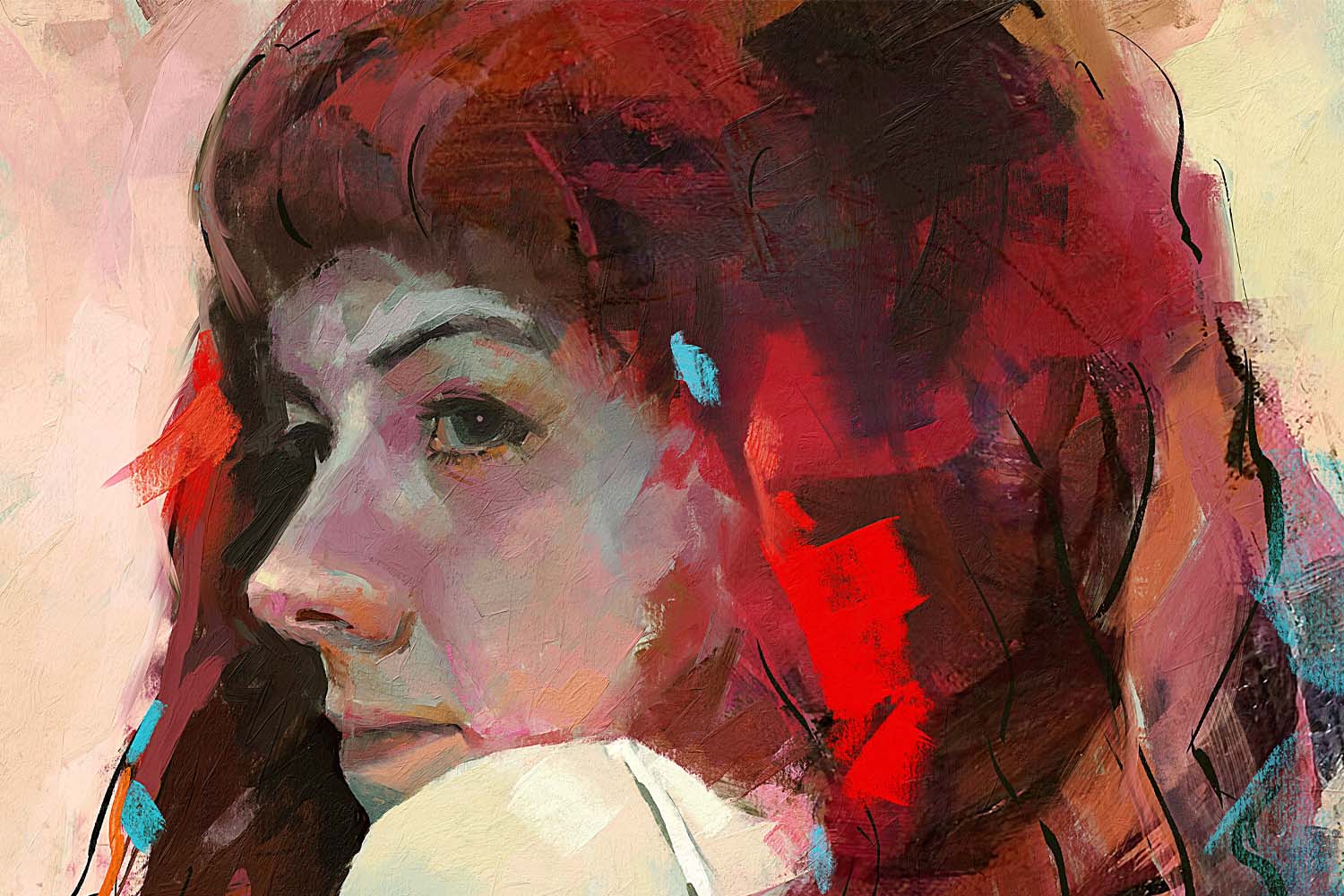

Rebelle 2.1 is out now, featuring many new fantastic additions such as an improved brush engine, amazingly realistic watercolor behavior, group support for brushes, papers & stencils, a handful of new shortcuts, tracing layer adjustments, and much more.
Another huge Rebelle update is released! We’ve been striving tirelessly for the greatest authenticity and to make Rebelle the most natural art software out there. This update represents one step ahead in our endeavors as we strongly focused on the painting behavior of many tools including watercolor, acrylic, ink, and pencil as well as on the implementation of other great additions that will make your painting process in Rebelle smoother than before. Let’s summarize the most complex features of the newly released 2.1 version:
Realistic watercolors - Rebelle’s watercolors are very close to the real thing, but we knew we could make them even better. From the 2.1 update you can see a difference in the watercolor simulation - strokes that diffuse now don’t have a hard edge when working wet on wet, they blend more smoothly and follow the paper structure better. This behavior is closer to real watercolors and it creates beautifully structured blends between colors:
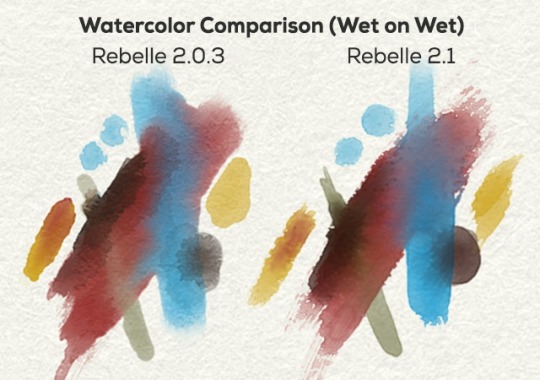
The Water slider of all wet tools is improved too - raising evenly from value 1 to 100 as opposed to older Rebelle versions when high water sensitivity was more notable at lower slider values.
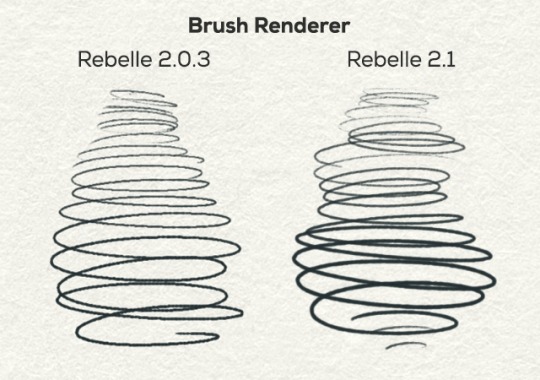
Improved brush renderer - Many of Rebelle artists noticed that thin lines drawn in older Rebelle versions were not as smooth as expected. This is now solved and works perfectly in the new update with both pencil, ink pen and other thin brushes. In addition, a new adaptive lazy mouse (line smoothing) is included, so when painting fast or very slowly, the lines are much nicer compared to previous versions:
Autosave - (Finally!) From Rebelle 2.1 your work will be automatically saved and hence protected from any loss. You will be able to find the last 20 versions of your work in the “Autosave” folder accessible via the Help menu -> Show Library folder. You can set your custom timer in the Preferences panel.
User Interface - Changes have been applied to the Rebelle user interface as well. The UI is now more compact, you can adjust the size of stencils and color icons; the brush icon thumbnails can now be changed to save space in the brush list - choose to show only image, stroke or brush name. You can quickly and easily copy & paste brushes between tools - either with keyboard shortcuts or via the right-mouse-button menu.
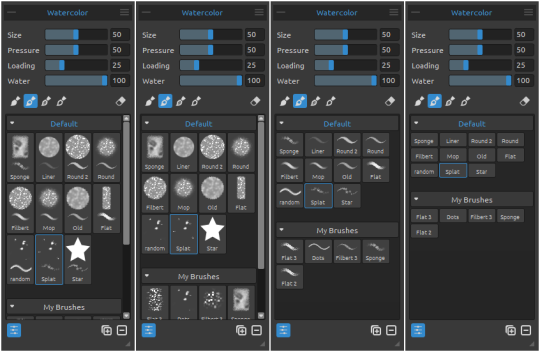
Categories - We made it easier to organize your creative assets by implementing support for groups. What does it mean? From this version, you can create your own brush, stencil, and paper groups, rename these groups, re-group within groups and much more.
What is more, now you can conveniently save and load your custom UI layouts using the Import / Export layouts option in the Window menu. You can also lock your current interface so that you don’t undock or merge any panel by mistake.
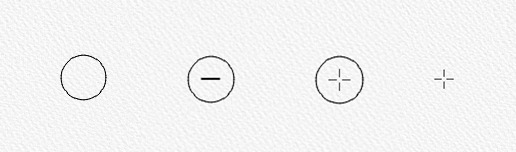
A great feature for all will be the ability to choose (in Preferences) from 4 different cursors: Circle, Circle with direction, Circle with crosshair and precise Crosshair:
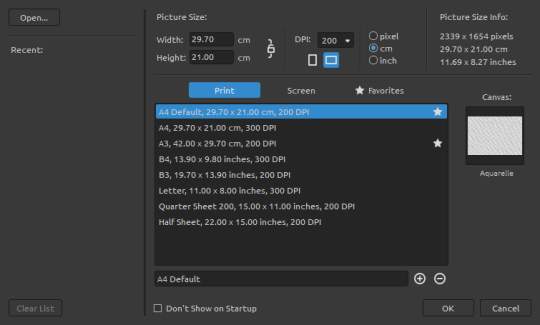
New Artwork Interface has a new design with ‘Print’, ‘Screen’ and ‘Favorites’ canvas sizes, a list of recently opened files, and an “Open…” file button.
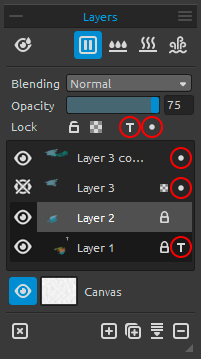
Modified Image Tracing - Tracing an image and picking the colors while painting is now easier with the practical Tracing Layer (T) and Influenced Layer ( • ) selection. You can pick the Tracing Layer with the “ T ” icon from the Layers panel and then choose layers into which you would like to paint with the “ • “ icon. You can anytime turn on/off the Tracing or Influenced Layer with a single click.
Improved Color panel - Now the option for setting a number of colors when creating a set from the image is available - you can choose between 4, 9, 16 or 25 colors. We also made it possible to create a color set from a text file (in *.txt or *.colors format). In Color Panel a button for secondary color has been added - we had this feature before and decided to bring it back to the newest update. With it, you are able to switch between primary and secondary color very easily which comes in handy when working with very few washes.
Keyboard shortcuts - We added some useful keyboard shortcuts as well as new shortcuts to the Preferences panel so that you can set your own. Canvas zooming is now available also with the keyboard shortcut (“Z” + mouse move), rotate canvas is now possible with the “R” shortcut. You can set your own shortcuts in Rebelle 2.1 for “Invert stencil”, “Flip stencil horizontally” and “Flip stencil vertically”. Custom keyboard shortcuts can now be saved as a .xml file for future reference.
See the rest of most of the comprehensive features added to Rebelle 2.1:
- Drag & drop of brushes, stencils and paper textures (from local disk, from the web browser and between groups)
- Drag & drop of PSD files
- Ability to open recent work or open/import work
- Option to set a custom color for Selection Tool in Preferences
- Ability to turn off rotation using two-finger touch while other multitouch functions (scale and move) work
- Ability to move selected and transformed areas and stencils by pixel using keyboard arrows
- Select All / Deselect All buttons added in the Selection tool
- Brush Creator - shape and grain texture preview, option for flip and invert the texture
- All selected layers can now be transformed simultaneously
- Added ability to switch on “Always show texture on paint” when exporting image (in Select Canvas)
- Ability to save and load custom keyboard shortcuts
- Many minor bug fixes
You can get Rebelle 2.1 update from our Download page or directly from within Rebelle’s menu: Help -> Update to 2.1. The update is free for all Rebelle 2 users.
You are welcome to share your opinion on the new update. You can do so in various ways: either from Rebelle’s Help menu -> Send feedback or more traditionally - via email at support [at] escapemotions.com. Tell us what you like, dislike and what you would love to see in Rebelle next. We value your opinion and are always super thrilled when a new feature suggestion lands in our Inbox, so don’t be shy and speak up :) We’re looking forward.
Your Escape Motions Team
Image Courtesy: Julija Lubgane | www.julijalubgane.com
Read an interview with this talented artist specializing in fashion illustration on our blog: http://bit.ly/2DTqBHW

What do you think?
0 Responses
0
Upvote
0
Funny
0
Love
0
Surprised
0
Angry
0
Sad
Sign in to comment!
how to make effect as screen in "water comparision" (wet to wet) ? - what brush configuration
Is there a way we can create our own stencils? is there a file extension that accepts?
Hi Jana, you can create stencil from an image file, from a selection or from the current layer in Rebelle - these settings are in the Stencils panel menu (the three lined button in the top right corner). If you have any stencils as png files you can either drag&drop them directly to Stencils list in Rebelle or copy them to Stencils folder accessible via Rebelle's menu: Help -> Show Library folder.
The improvement in acrylic quality is very good. I have a question about whether it is possible to add a knife to an acrylic type that works without loading paint and charging.
Impasto painting is very interesting.
Greetings Andrzej
Sorry for my English.
Hi Andrzej, the knife brush is something we'd like to add in the future.
I normally use the pause button to paint so it would be nice to have an option for faster process of the running color. Basically i pause, paint something, unpause, wait for the watercolor do its thing, fast dry and repeat.
It would be cool adding other effects how the color run on the paper
Here are some examples
https://www.youtube.com/wat...
I like the adding of the salt in this one
https://www.youtube.com/wat...
Hi Ivanana, thanks for your insights! We will probably implement some kind of a timer for diffusion in the future.
We'd also like to include some of the effects from the videos, especially the salt effect. Stay tuned!
No change in the speed here. 2.1.x versions are significantly slower than the 2.0.3. If I move the cursor over the sheet (only moving no painting) than I already can see the delay of the cursor (it stutters). Very smooth in 2.0.3
MacBook Pro (13 Zoll, Mid 2012)
2,5 GHz Intel Core i5
8 GB 1600 MHz DDR3
Intel HD Graphics 4000 1024 MB
Hello Horsch, please try the recent v.2.1.3. Your computer should be fast enough. Please try to run only Rebelle, no other application. Specially close the browsers, they usually use a lot of memory.
Hi guys, you can download new 2.1.1 now. Watercolor simulation is faster, watercolor brushes too, problems with Surface multitouch is fixed :) Get here and let us know your feelings: https://www.escapemotions.c...
Thanks for the quick update that's impressive, but i'm afraid there is still something wrong with the amount of water when the brushes shouldn't be much wet. In 2.0.3 you could really see the canvas textures through the strokes while on 2.1 and 2.1.1 it is soaked a bit, I made a comparison here: https://drive.google.com/op...
(I made few strokes with different amount of water as the slide sensitivity is different)
Hi Doron, please download v.2.1.2, the canvas texture influence is changed. In the 2.0.3 it was too strong, and in 2.1 / 2.1.1 too soft, it should look more realistic now. Thank you for your feedback! https://www.escapemotions.c...
Thanks Peter, It looks really better now. A small thing I've noticed now, because the dry strokes are less observing the canvas' texture as much as before, the repetition of the brushes is shown clearly. So when I'm interested in adding some dry strokes to a painting, I need to be careful not to get too low on the value of water to avoid that, this is kinda bummer.
Hi Peter, I am attaching hereto a link to show my experience with new Rebelle update 2.1.1. To be honest I am facing some weird things regarding watercolour engine and there is doubt it is faster or not. Is the ending shape of colour dripping similar to reality? There are some weird textures (?) evolving too at the time of diffusion.
Hope all will be fine soon :)
Best regards :)
The link: https://drive.google.com/dr...
Hi Joy, please download the recent v.2.1.2, I fixed drops, they should behave nicely now :) Thank you for your feedback! https://www.escapemotions.c...
I noticed the background paper texture along with some strokes shift up and down sometimes (glitchy behavior). Has this been fixed?
This bug is in Qt framework we use for development. It is not easy to fix because it is not in our code. It is kind of incorrectly implemented optimization which does not happen when the canvas is rotated. But we must find a solution to this.
Good to know, hopefully they fix it soon. Thank you.
Thanks Peter :)
Here is watercolour dripping comparison between v.2.0.3 and v.2.1.2. https://drive.google.com/dr...
Was v.2.0.3 more realistic?
But now texture is OK after diffusion.
Best regards :)
Hey Peter,
As mentioned before, there something odd with the water, it's seems I cannot get a true dry brush in this version. I know the slide's sensativity had chanced, but is seems behond that.
Also, Everytime Rebelle auto saves (which is awsome!!), the diffusion's render stops and I cannot paint at all.
Hi Doron, dry watercolor brush should work in the latest v.2.1.1. You are right, auto save stops all painting on the canvas.
The new version is definitely slower and soaking with water gives me poor results.
I am going to buy a program but I have to stop, maybe there will be some amendment.
My system Win7 64 bit, i5, 8GB RAM.
Regards
Thanks for feedback, I found a bug in the watercolor engine, it will be fixed in the next version (hopefully this week).
Hello Peter
I have one more query about the brush "Clin Water", which does not have any color according to the help, works correctly when I distribute a color, but when it is partly outside the color area, it begins to paint in black.
Is this a mistake?
Greetings Andrzej
W dniu 2018-02-13 o 17:30, Disqus pisze:
Hi Andrzej, is this happening while working with GPU brush engine only? I have been experiencing the same from the version 2.0.3 and in this new version the problem does remain also. Hope soon this will be fixed in the next update.
Best Regards :)
My System: Win 10, AMD FX-8350 Eight-Core Processor, 24 GB RAM, AMD Radeon RX 460 Graphics (4 GB)
Hi Joy,
You are right, this problem only occurs with the experimental GPU, I also hope that this problem will be removed in the next version while improving the error with the speed of paint flow.
Greetings Andrzej
Let's hope so :)
Hello, please download v.2.1.1. Watercolor engine and brushes should be faster now. Thank you for your patience. There are many new features, we redesigned brush engine which is connected to the simulation, so unbelievable number of issues were fixed last months, but something always comes up :) The GPU brush engine is still in experimental stage.
Hi Peter, thanks a lot for kind response. Many thanks for this valuable update. I have downloaded and finding out new improvements in water media.
Other newly added features are great! And eagerly waiting for improved GPU engine (very much required for working faster with larger canvas)
Best regards :)
do you guys have any written tutorials? about the tools
Only the manual, which is quite comprehensive.
where we find that? Although I saw a very good tutorial from Aaron Rutten
Here: https://www.escapemotions.c...
New version 2.1 feels very slow compared to the 2.0.3 version! All engine optimizations of the last versions are already gone? I switched back to 2.0.3
That’s what I thought bought too. ????
Hi Horsch, what exactly feels slower? What is your computer config? We can look into that.
The speed will be fixed in the next version (hopefully this week).
The Rebelle v 2.0 series have been slower and buggier than v1.5.5 and the v2.1 update just made it worse (I've since uninstalled all Rebelle versions). Seems they don't do enough testing with their software. FWIW, version 1.5.5 works like a charm with windows 7, very smooth feeling on the brushes.
Hi guys, we just released v.2.1.1. Issues with waterecolor engine and brushes should be fixed. Thank you for your patience. There are many new features, we redesigned brush engine which is connected to the simulation, so unbelievable number of issues were fixed last months, but something always comes up. I believe you will like what we prepared :)
Thank you, I'll check it out!
All brushes are very delayed. I have 2.03 and 2.1 installed and the differences are clearly noticeable. Other thing: the trackpad navigation (zoom, pan, rotate) don't work with 2.1 (the program freezes for 10 seconds before I can do something again). No problems with 2.03
What is your computer config?
I've had similar problems with V2.1 on my Surface Pro 4 (i5 4gb Ram). The touch screen zoom, rotate didn't work but also the resolution was weird, as if its 800x480. The icons looked pixleated as did the brush strokes. I went back to 2.0.3 and runs fine. You should able to see what I mean here: https://imgur.com/a/ldNRO
Hello, I totally support your opinion,
version 2.03 is definitely faster. In 2.1, the paint barely flows and soaking the paint with water gives me poor results.
Greetings Andrzej
sounds fantastic--can't wait!
amazing! can't wait to download the new update and reinstall...quick question:
why doesn't rebelle yet have a dynamic update system that takes care of all of this for me? is it in the works?
Hi Komeil, just open Rebelle 2 and from the menu -> Help, you can directly download and install v.2.1. There is no automated download system running at the background.
Peter,
thank you for the response. Maybe my question wasn't clear. I am wondering if there are plans to implement an auto-update functionality in rebelle
We have a plan to add it in one of the future versions, but probably not in the next one.
awesome, thanks Peter!