Flame Painter Experimental |

Flame Painter Experimental |

Flame Painter is a unique paint program, it belongs to my 'I am an Artist' experimental project. I think with tools which inspires you, everyone can be an artist. You can try it here, change different brush settings and paint your own flame paintings. When you change the background from black to white, the palette changes from additive to subtractive and the feeling of the painting is very different. It's not easy to explain all brush parameters, so I leave this for your experimentation.
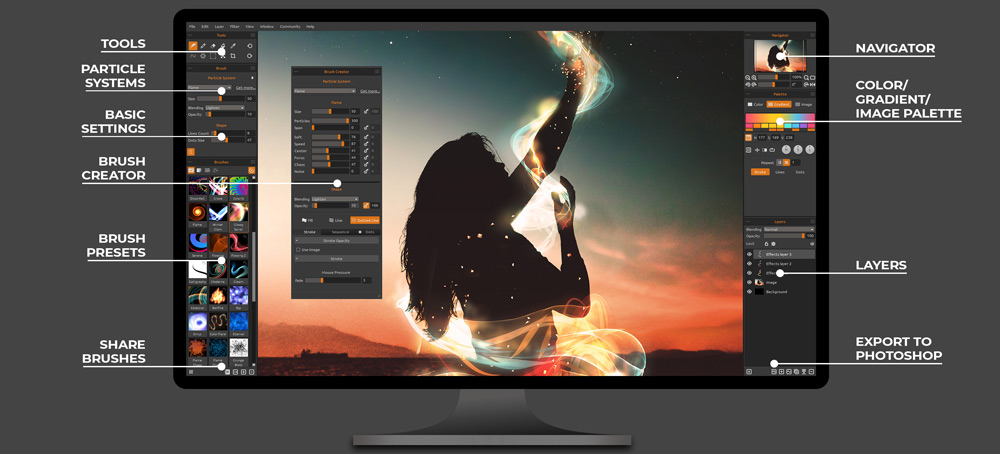
If you would like to try the full featured Flame Painter 4 , you can download the demo here (for Windows 64-bit) , here (for MAC OS) or get it here .
Check out new
Rebelle
- the real watercolor and acrylic paint program,
Amberlight
- abstract art tool based on particles, or
Fluidance
motion effect program.
You can try more experiments here.
UPDATE 7. Nov. 2019: This is a new Javascript version, we have removed the Flash version as it was not working correctly on most browsers. I have added a new SYMMETRY slider, so you can have fun with symmetrical kaleidoscopic images.
UPDATE 10. Aug.2015: This is a new Flash version, we have removed the old Java version, because it was not working correctly on most browsers anymore. I added new SAVE and Facebook share buttons, which should finally work on all systems and browsers.
Programmed in
processing
.
Copyright © 2008 - 2026 Peter Blaskovic | escape motions
0 Responses

0
Upvote

0
Funny

0
Love

0
Surprised

0
Angry

0
Sad
Create Account



i dont know
Hi, Where is the save button on the free online version? In your description you have a "save", but I can't find it on the screen?
I love doodling with this :-).
Thanks
Gaby
Hello Gaby, I am sorry, it's a mistake, I removed the text from the website.
I am looking for this:
SAVE - save your artwork to your desktop
I came to your website through Peter Brownz. He uses the flames in some of his tutorials, so I need to "save" them please :-)
Thank you
Hope wherever you are, you are safe.
hey baby why havent i heard from you in a while?
uh hi, I know for a fact that I have adobe flash player but it says I have to download it. The issue only happens here, not with any other site that uses flash player... Also I can't download the demo as it says the page wasn't found...
Hi there,
for some reasons the Flash does not ask for the permission to run. You need to click the lock symbol in the bar next to the website address > Site Settings > Flash and select "Allow" from the drop-down menu. Then reload the page, it should work now.
Demo links should work as well - please try it in your browser and let us know.
Thanks!
can i get my own background in flame painter???
Hi there, you can change the color of the background in File->New. If you have a specific background, you can import it onto a new layer as an Image via Import button. Hope this helps!
Hi Petter, I disagree that the full
version is worth money, since most people, like me, do not have enough
money to buy it or not that type, as I am from Argentina, I do not have
euros or dollars. In addition, there are people who have
money, or have enough, and do not want to draw, or just do not know, but
they buy it equally because they are bored or simply because they want
to spend their money, instead, there are other people who have The ability to draw, but do not have that kind of money or do not have enough.
I hope you hear my complaint.
Greetings. Carolina P.
Hi Carolina, thank you for your opinion. We've been developing Flame Painter for almost 8 years putting a lot of work and effort to it, so we do think it is worth the money. If someone cannot afford to buy something it is understandable he will not buy it, but we do not see the point of claiming that the thing is not worth the money. If you just want to play with Flame Painter without buying it feel free to do so - you can use the free Demo or this online version for such purpose. Also we do not think that someone will buy Flame Painter only because he has a lot of money - that is a nonsense - our users are always interested in the software and want to use it when they buy it. Of course, there are people with a huge drawing talent and also people without drawing skills but that's why Flame Painter is great - you don't need to be an artist to create nice outcomes in the software. Even children love to play with Flame Painter for its unique and beautiful results. Hope my reply finds you well and you will understand my point of view. Thank you and have a nice day!
true true, im from ireland
Is there a way to download the image as a transparent PNG file? I need to overlay it on top of another image and I will only need to use it once.
Hi Richie, thank you for your post. It is not possible to save with transparent background in the free online version. Full version - both personal and pro edition - have this feature.
It would be nice to be able to upload images and flame them. I guess the full version, with layers, offers this possibility but I only want to burn the one image.
Hi Timothy,
this is a free online version of Flame Painter. Many features are missing as it needs to be as simple as possible to run seamlessly in browsers. You can use "Import" function in the full version of Flame Painter. Thanks!
This kind of application looks wonderful and really interesting especially that they can create some wonderful design from this that might add some colors on their work.
My friend just purchased the flame painter for me for Christmas and the registration key isn't working nor will the plug in work for photoshop cc. I really need help but I'm not getting a response from customer service.
Hellop Ace, we've just send you an email, please check your inbox. Thanks!
It worked thank you so much, I've been wanting this software for a while now and I'm super excited to work with it.
Here is the video
https://youtu.be/LeeRM3-HU9U
Thanks! :)
This is to peter the creator of this site. Can i use pictures I made with your site in YouTube videos if I put you website link in the description and give you a shout out to? I can do one or the other or both. Can you please respond.
Hello Toby,
Yes, you can use pictures created in Flame Painter Free in your Youtube videos. Mentioning the program and our website would be very nice of you. Once you publish your videos, please send us the links - we're eager to see them!
Many thanks!
Peter
Thanks
Just discovered this site and makes me relieved from the stree from work! Thanks for creating this site! You're a genius! :)
Thank you Rhalyn for your kind words!
A shout to the creator of this website: Thanks for creating this amazing website. Its fun to use in school, on the run, or anywhere. To actually try something or just to mess around is just the best. Thank you for all the effort you put into this website.
Thank you Nick!
yo vine por xpresstv no me jusguen