Rebelle Experimental

Rebelle 7 |
Rebelle 7
|
|---|---|
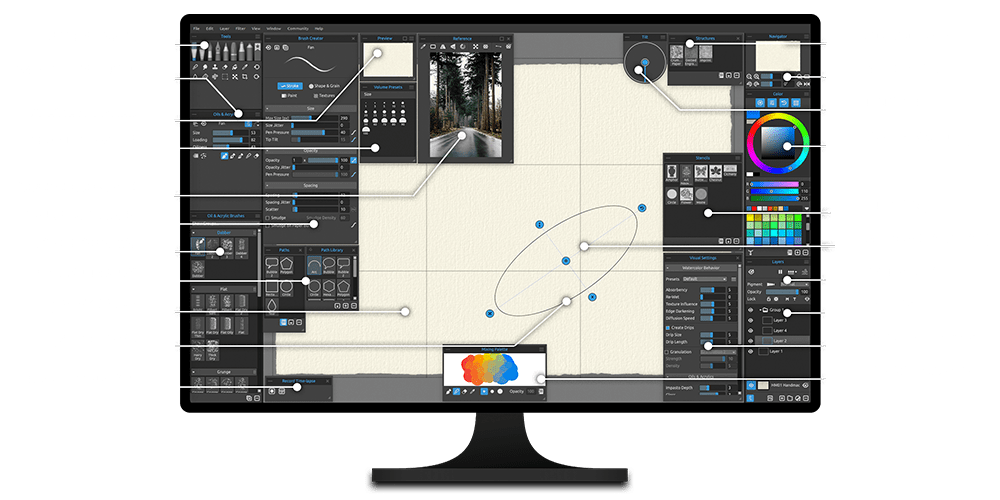
| Award-winning painting software with intuitive interface that lets you create realistic oil, acrylic, watercolor, wet and dry media artworks. For individuals, enterprise and schools. 7 default paper and canvases included. 3 computers. |
State-of-the-art solution for artists seeking the hyper-realistic behavior of various painting mediums supported by the latest technology in the digital world. For individuals, enterprise and schools. 7 default paper and canvases included. 3 computers. |
|
|
|

Try the online experimental version of Rebelle - a first prototype of the natural media paint
program with a focus on real watercolors and acrylics. This experiment was developed
before the software's official release back in 2016. Peter had worked on this technology for more
than two years to achieve the most realistic watercolor painting tools possible.
To test the most recent version of Rebelle directly on your computer, download the free Trial version.
Paint, smear, wet already dried colors, blow them on the paper, tilt the paper to create water drops
and get all these beautiful watercolor effects.
This project is quite compute-intensive, so please close all unnecessary browser tabs. It is better
to have a faster processor, Intel i7 or at least i5. :)
You can try more experiments here.
Programmed in processing.
Copyright © 2015 -
2026 Peter
Blaskovic | escape motions
Create Account







Can you set in this watercolor experiment platform a feature to save certain colors, 5 or 7 and pick them ready from the icon list, not by HSB
I am just spell-bound at this updated version. Really great.
Wow this is amazing and just what i needed, thank you very much!
Hi Peter, can any of the images made on Rebelle be exported into vector format?
Hi Dante,
at the moment, no, but we will consider such feature for the future Rebelle versions.
Thanks for the quick response! Good job on the apps though -- I wish I had your talents ;-)
Haha, thank you! :)
As a work-around, you can create your artwork in Rebelle 3, export as PNG, open in Adobe Illustrator or other vector program, and IMAGE TRACE / EXPAND your art. Fiddling with setting in the image trace panel will fine-tune your results.
I tried to order Rebelle 3.0 and used the CORRECT credit card information but it appears that the order was rejected or hacked (something about blocking Adobe flash showed up. Is the site working correctly?
Hi Howard, please write to our support, there should be no problem with a payment process.
How do I upload an image?
You can upload image only into full version.
How many computers can I put this on?
You may install the full purchased Software version on your personal computers provided that not more than one of those computers is in use simultaneously and that those computers are solely for your own personal use. This free version of Rebelle is only a version for browsers - feel free to open it on any number of computers.
Hi, how do I get student discount?
Hi Taynara, please send us a snap of your student ID via email, we'll get back to you, thanks!
Any plan to get a version of rebelle for ipad pro?
Hi Ludo,
We are now focusing on building Rebelle as a full-featured desktop application. At this stage Rebelle needs a strong hardware to be able to run smoothly, iPad would not handle this well. Based on how difficult it will be to build such compute-intensive app for iOS, we'll decide whether to develop Rebelle for this platform.
However there is a workaround - many users connect Rebelle on their Mac with their iPads via Astropad app - maybe that's something you'll find interesting too.
Hi Peter, i don`t find the registration field for my license key. I had install the demo version and open the program. I can chose two buttons demo or bye, but the is no registrationfield. Thank you for your patience
Hi Cenci, thank you for purchasing Rebelle! Please download the full Rebelle version from our Download page http://www.escapemotions.co.... Demo version cannot be registered.
I would be interested if there were any color but blue.
Hi Vicky,
you can easily adjust the color using the HSB sliders next to the color square, or try the free Demo: http://www.escapemotions.co...
Cheers!
Peter
P.S. Hello Peter, I want to inform you that ad I got regarding my 18 drivers being out of date, was a malware which pops up when trying to download your software. Fortunately I was able to uninstall it before it did any harm to my computer. But perhaps you could try to do something to fix that so that others don't get the same issue. Meanwhile my only question now would be whether I can use Rebelle with just 8GB RAM, or if I'd have to upgrade to 16 RAM. Thank you.
Hello Ron, I am sorry to hear about these malware issues, can you please let me know which browser you use and also its version? From where did you download the free Rebelle? We'll check this on our side.
Rebelle will work on 8GB RAM, the most important hardware for Rebelle right now is processor - the newer and faster, the better.
Looking forward to your reply,
Peter
Hello Peter, I bought Amberlight 2 several days ago and was ready to purchase your software tonight, but all I saw were "Free Downloads." Since there was no "Buy" Option anywhere I then assumed I could get your product for free, thinking that perhaps Amberlight 2 and Rebelle were the same company. But when I attempted the download, I was told that I had 18 drivers out of date. So I spent (threw away?) 40 bucks to upgrade my drivers. Tried your "free" download again and instead got a site that does PC clean up for a charge. Now I have no idea what to do and wonder if I really needed those drivers to get your product. I also have to wonder if it would even work on my computer which has only 8GB RAM. Hope to get a response soon, because from what I read, I think Rebelle would really help my photo editing.
The best watercolor emulation I've ever seen to date. Great for artists and illustrators, and I can't have enough of it. The water FX is priceless. Thanks and Godspeed!
Thanks Bob for your kind feedback! :)
I'd like to see this on a big tablet, reading the gyroscopic sensor to get the tilt angle and full touch interface and pen support. The surface 3 device seems a good candidate, hope you'll relase this kind of improvements.
Thanks for the feedback! We'd like to implement these features in the future. Pen pressure on Surface 3 works with installed Wintab driver at the moment.